
Native Product Ads in Console Business Manager
Overview
Native Product Ads in the Console Business Manager is a new ad type designed to make it easier for retailers and advertisers to create engaging, multi-product ad placements, like sponsored brand banners or display ads with product sets for attribution. These ads dynamically link a single creative to multiple products from your catalog — no manual setup or attribution rules required.
By surfacing native product ads directly in the Console Business Manager, you can now build high-performing product ads faster, with less overhead and more consistency.
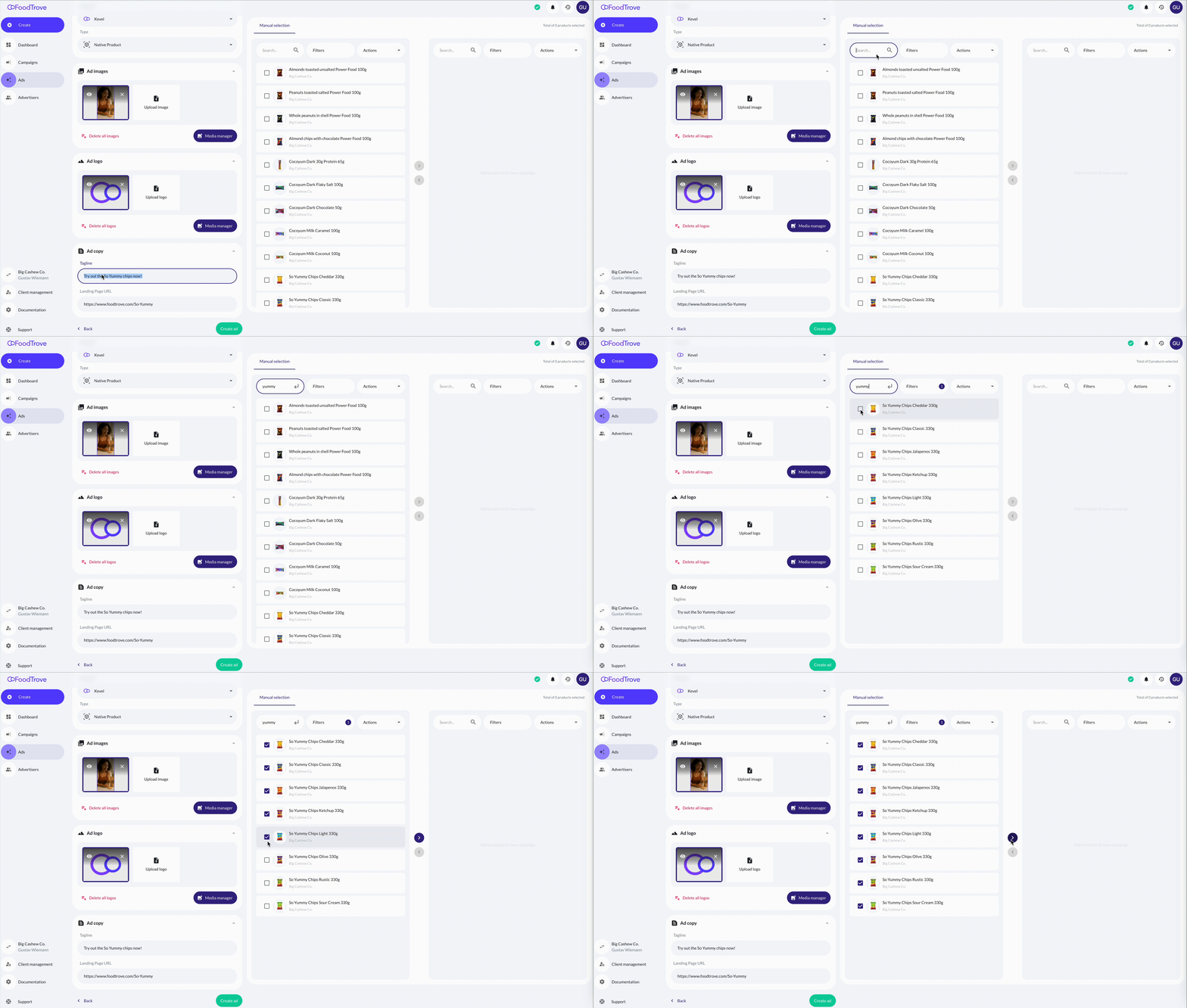
In the example above, the advertiser Big Cashew is creating a Native Product Ad called Shoppable Units for a product line called _“So Yummy Chips”.
- Only required fields in this case image, logo, tagline, URL) are editable by advertisers. The required fields as well as optional fields depends on the Creative Template created in the Kevel
- Product data (e.g. name, image, price, brandname) is pulled directly from the catalog
Below is the creative template that it used in the above Business Manager. As you can see not all fields are present in the Console Ad Builder. The population of these fields are handled by a specific job and the mapping stored in the AdTemplate.
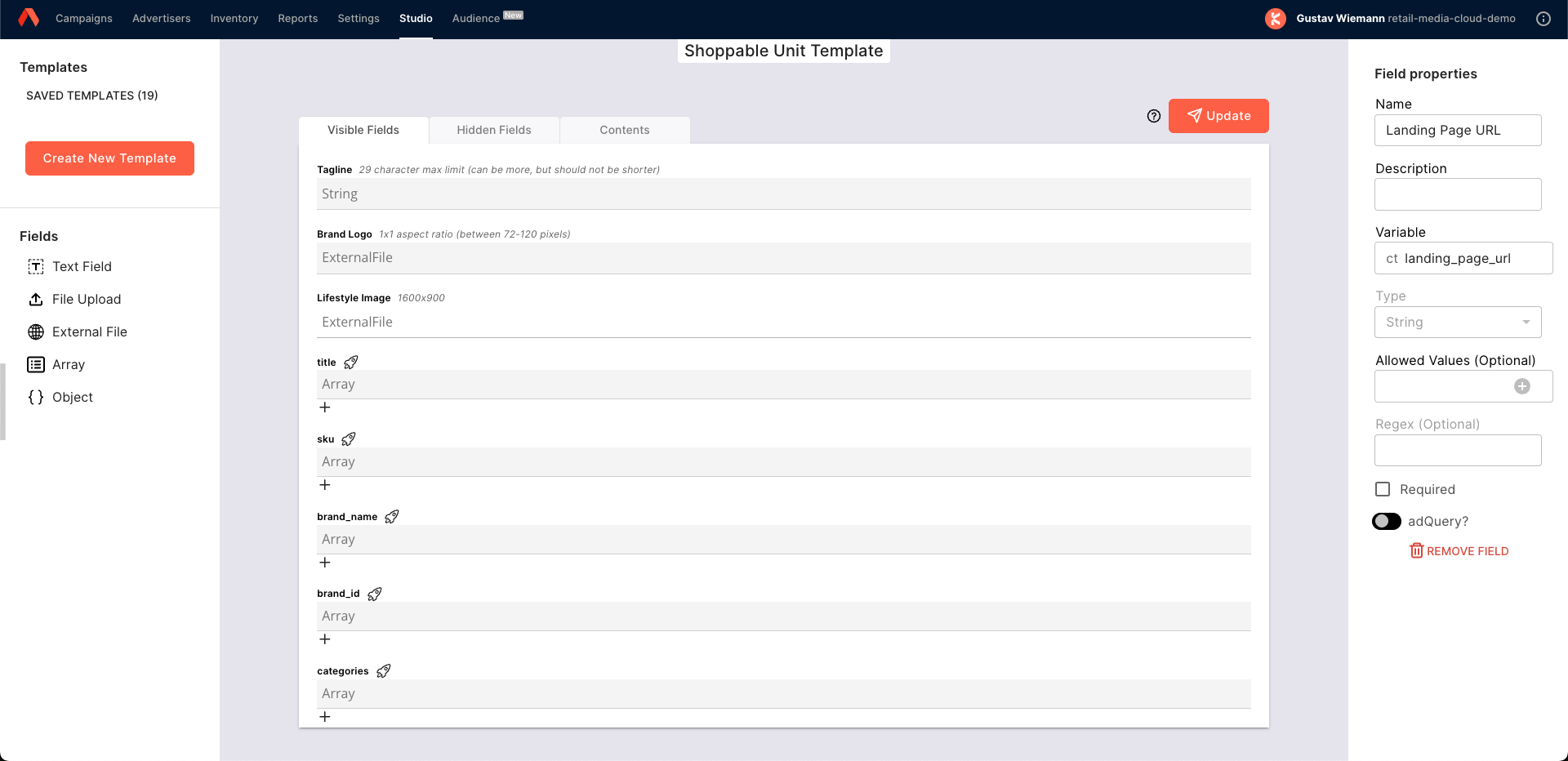
More information on Native Product Ads and how they work in more technical detail can be found here: Native Product Ads
Who This Helps
- Retailers: Easily offer dynamic native ad formats to advertisers
- Advertisers: Quickly launch product-rich creatives without managing product data manually
What’s Changed
This is a new feature, now available in the “Ads” stage of the campaign booking flow in Console Business Manager.
Where to Find It
To create Native Product Ads:
- Head to Console Business Manager
- Start creating a campaign
- Proceed to the “Ads” stage of the booking flow
- Select from available Native Product Ad templates — these are defined by the retailer
- Fill in any required advertiser inputs — the rest is auto-filled based on the template and product catalog.
How It Works
- Native Product Ads are powered by predefined creative templates created in the Kevel Creative Studio
- Advertisers only complete required fields (e.g. images, tagline, URL)
- The system automatically pulls in catalog data (e.g. product image, title, price)
- One ad creative can be linked to multiple products
Example Use Cases
| Scenario | Description | Example |
|---|---|---|
| Sponsored Brand Banners | Highlight a brand’s top products in a cohesive, native format | “Nike’s Fall Picks” banner with 3 featured shoes |
| Multi-product Display Ads | Drive performance with scrollable or static product sets | “Top Deals This Week” ad with 4 discounted items |
Benefits
- ✅ Faster Setup – No need to manually attach product data or configure rules
- ✅ Retailer-Controlled Templates – Tailor input fields per creative template
- ✅ Multi-product Creative Support – Perfect for high-impact formats like carousels or brand showcases
Important Notes
- This feature is currently available in Console Business Manager only
- Retailers must configure which Console ad templates are available to advertisers
- To enable Native Product Ads on your account, contact your Kevel account team or Kevel Support
Updated 4 days ago