
Connect AI agents to Kevel through a secure MCP server for read-only access to campaign, inventory, reporting, and forecasting data.
Connect AI agents like ChatGPT, Claude, or custom clients to Kevel through a standard Model Context Protocol (MCP) server.
Kevel's MCP server gives agents secure, read-only access to campaign, inventory, reporting, forecasting, and related network data using your existing Kevel API key.
Overview
Kevel's MCP server lets AI agents query Kevel through a standard MCP interface instead of integrating directly with multiple APIs. The server is read-only and is designed for safe exploration and analysis of data across your network.
Use cases include:
- Reviewing advertisers, campaigns, flights, ads, creatives, and targeting
- Querying inventory such as channels, sites, and zones
- Running and polling reports
- Checking forecasts and ad products
- Reading catalog, content, and job data
- Requesting ad decisions for analysis or testing
How to use
Before you begin
You will need:
- Access to the Kevel Management UI
- A valid Kevel API key
To generate an API key:
- Open the Kevel Management UI
- Go to Settings
- Generate or copy an API key
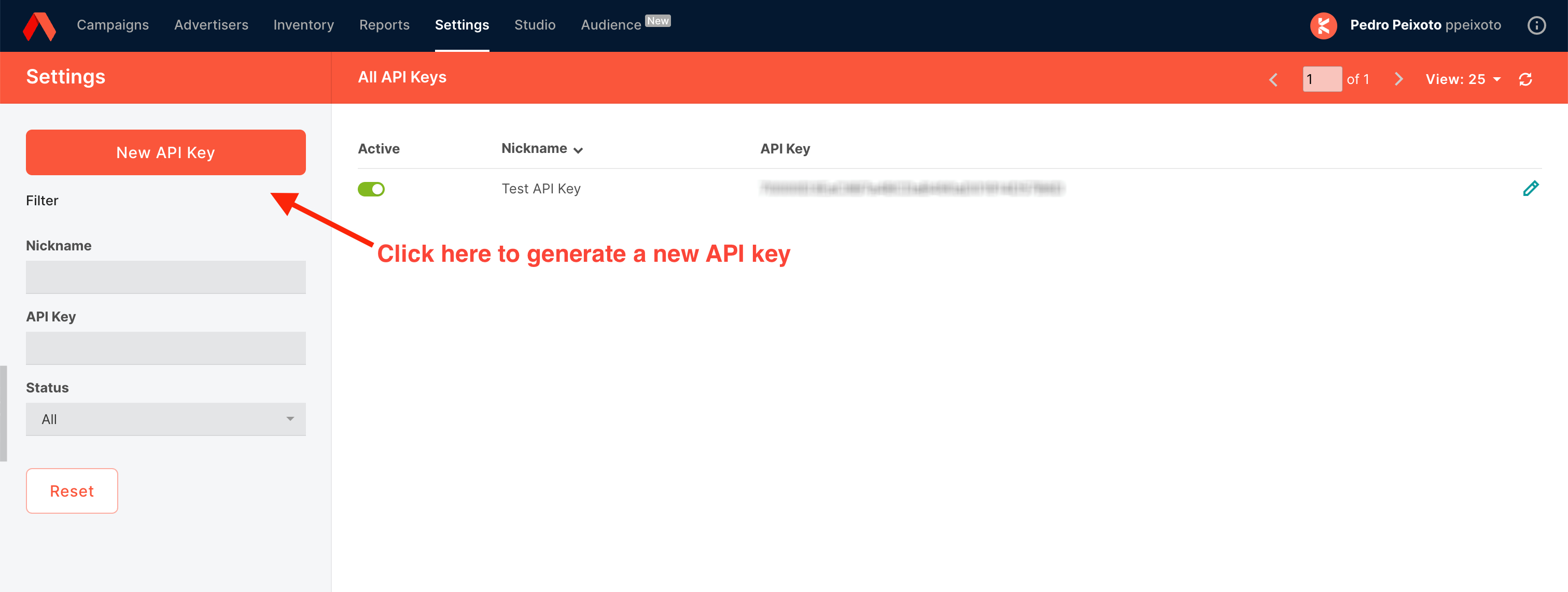
Please noteWe recommend generating a new API key specifically for MCP usage rather than reusing a shared key. This makes it possible to audit on a per-user basis, since each key can be associated with a single user and use case.
Connect to the MCP server
Add the Kevel MCP server to your MCP-compatible client using:
Server URL: https://mcp.kevel.com/
Authentication: Kevel API key
After adding the server, authenticate using your API key from the Kevel Management UI.
The exact setup flow depends on the client you are using. Setup steps for the most common clients are below.
Claude
Custom remote MCP connectors are available on Claude Pro, Max, Team, and Enterprise plans. On Team and Enterprise plans, an Owner must add the connector at the organization level before individual members can enable it.
- Open Claude in your browser and click your profile icon, then Settings.
- In the sidebar, click Connectors.
- Scroll to the bottom and click Add custom connector.
- Enter:
- Name: Kevel
- Remote MCP server URL:
https://mcp.kevel.com/
- Click Add.
- Back on the Connectors page, open the new Kevel connector and connect using your Kevel API key when prompted.
Once connected, Kevel tools will appear automatically in your Claude conversations.
ChatGPT
Custom MCP connectors in ChatGPT require Developer Mode, which is available on Pro, Plus, Business, Enterprise, and Edu plans. On Business and Enterprise/Edu workspaces, an admin must first enable Developer Mode in workspace settings before users can add connectors.
- In ChatGPT, go to Settings → Apps & Connectors → Advanced settings.
- Toggle Developer Mode to ON and confirm the warning.
- Return to Apps & Connectors and click Add new connector.
- Enter:
- Name: Kevel
- Description: Kevel ad server (optional)
- MCP Server URL:
https://mcp.kevel.com/
- Complete the connector setup and authenticate with your Kevel API key when prompted.
Enabling Developer Mode disables ChatGPT memory automatically.
Cursor
Cursor supports remote MCP servers via the mcp.json configuration file. You can scope the server globally or per project.
-
Open Cursor and go to Settings → Tools & Integrations (or Tools on the Free plan).
-
Under MCP Tools, click Add Custom MCP. Cursor opens the
mcp.jsonfile.- Global config lives at
~/.cursor/mcp.json(macOS/Linux) or%USERPROFILE%\.cursor\mcp.json(Windows). - Project-scoped config lives at
.cursor/mcp.jsonin your project root.
- Global config lives at
-
Add the Kevel server entry:
{ "mcpServers": { "kevel": { "url": "https://mcp.kevel.com/" } } } -
Save the file. Cursor will prompt you to authenticate with your Kevel API key. A green dot next to the server name indicates a successful connection.
Other clients
For client-specific setup instructions not covered above, refer to your MCP client's documentation. This is the best place to find the latest steps for MCP-compatible tools.
Verifying the connection
In any client, ask the agent to list available tools or run a simple read, for example:
List my advertisers in Kevel.
The agent should call kevel_list_advertisers and return results from your network.
Available tools
Reporting (7 tools)
kevel_create_report— Create async queued report (returns GUID)kevel_get_report— Poll for queued report resultskevel_get_instant_counts— Real-time counts for a single entity (90-day window)kevel_get_bulk_counts— Real-time counts for multiple entitieskevel_list_report_runs— List report execution historykevel_list_scheduled_reports— List scheduled reportskevel_get_scheduled_report— Get scheduled report by ID
Management (34 tools)
kevel_list_advertisers— List/search advertiserskevel_get_advertiser— Get advertiser by IDkevel_create_advertiser— Create an advertiserkevel_update_advertiser— Update an advertiser (full replace)kevel_list_campaigns— List/search campaignskevel_get_campaign— Get campaign by IDkevel_create_campaign— Create a campaign under an advertiserkevel_update_campaign— Update a campaign (full replace)kevel_list_flights— List flights (filter by campaign/advertiser)kevel_get_flight— Get flight by IDkevel_create_flight— Create a flight under a campaignkevel_update_flight— Update a flight (full replace)kevel_list_ads— List ads (filter by flight)kevel_get_ad— Get ad by IDkevel_create_ad— Attach a creative to a flight (create ad)kevel_update_ad— Update an ad (flight-creative mapping)kevel_list_creatives— List creatives (filter by advertiser)kevel_get_creative— Get creative by IDkevel_create_creative— Create a creative under an advertiserkevel_update_creative— Update a creative (full replace)kevel_list_creative_templates— List creative templateskevel_get_creative_template— Get creative template by IDkevel_create_creative_template— Create a creative templatekevel_list_segments— List segmentskevel_get_segment— Get segment by IDkevel_create_segment— Create a segmentkevel_update_segment— Update a segment (full replace)kevel_list_priorities— List priorities (filter by channel)kevel_get_priority— Get priority by IDkevel_create_priority— Create a priority under a channelkevel_update_priority— Update a priority (full replace)kevel_list_advertiser_segments— List segments for an advertiserkevel_list_flight_categories— List flight categorieskevel_get_entity_counts— Get counts of all entity types
Inventory (18 tools)
kevel_list_channels— List channelskevel_get_channel— Get channel by IDkevel_create_channel— Create a channelkevel_update_channel— Update a channel (full replace)kevel_list_channel_priorities— Get priorities for a channelkevel_list_channels_for_site— List channels for a sitekevel_list_sites— List sites (filter by channel)kevel_get_site— Get site by IDkevel_create_site— Create a sitekevel_update_site— Update a site (full replace)kevel_list_zones— List zoneskevel_get_zone— Get zone by IDkevel_create_zone— Create a zonekevel_update_zone— Update a zone (full replace)kevel_list_ad_types— List ad types (filter by channel)kevel_list_channel_site_maps— List channel-site associationskevel_create_channel_site_map— Map a site to a channelkevel_update_channel_site_map— Update a channel-site map
Decision (1 tool)
kevel_request_decision— Request ad decisions
Forecast (8 tools)
kevel_create_forecast— Create a new forecast (existing/available/deliverable)kevel_list_forecasts— List active forecastskevel_get_forecast— Get forecast by IDkevel_list_traffic_modifiers— List traffic modifierskevel_get_traffic_modifier— Get traffic modifier by IDkevel_get_forecast_network_settings— Get forecast network settingskevel_list_ad_products— List ad productskevel_get_ad_product— Get ad product (optionally with targeting sets)
Targeting (25 tools)
kevel_list_flight_segment_targeting— List segment targeting on a flightkevel_get_flight_segment_targeting— Get segment targeting rule on a flightkevel_create_flight_segment_targeting— Create segment targeting rule on a flightkevel_update_flight_segment_targeting— Update segment targeting rule on a flightkevel_delete_flight_segment_targeting— Delete segment targeting rule from a flightkevel_list_ad_segment_targeting— List segment targeting overrides on an adkevel_get_ad_segment_targeting— Get segment targeting rule on an adkevel_create_ad_segment_targeting— Create segment targeting rule on an adkevel_update_ad_segment_targeting— Update segment targeting rule on an adkevel_delete_ad_segment_targeting— Delete segment targeting rule from an adkevel_create_flight_sitezone_targeting— Create site/zone targeting rule on a flightkevel_update_flight_sitezone_targeting— Update site/zone targeting rule on a flightkevel_delete_flight_sitezone_targeting— Delete site/zone targeting rule from a flightkevel_list_flight_geo_targeting— List geo targeting on a flightkevel_create_flight_geo_targeting— Create geo targeting rule on a flightkevel_update_flight_geo_targeting— Update geo targeting rule on a flightkevel_delete_flight_geo_targeting— Delete geo targeting rule from a flightkevel_list_flight_distance_targeting— List distance targeting on a flightkevel_create_flight_distance_targeting— Create distance targeting (lat/long + radius) on a flightkevel_update_flight_distance_targeting— Update distance targeting on a flightkevel_delete_flight_distance_targeting— Delete distance targeting from a flightkevel_list_flight_day_parting— List day parting rules on a flightkevel_create_flight_day_parting— Create day parting rule on a flightkevel_update_flight_day_parting— Update day parting rule on a flightkevel_delete_flight_day_parting— Delete day parting rule from a flight
UserDB (2 tools)
kevel_read_user— Read full user recordkevel_get_user_segments— Get user's segment IDs
ContentDB (1 tool)
kevel_get_content_record— Get content record by schema/key
Catalog (7 tools)
kevel_list_catalogs— List product catalogskevel_get_catalog— Get catalog by IDkevel_list_catalog_items— List catalog items (with search)kevel_get_catalog_item— Get catalog item by IDkevel_upsert_catalog_items— Insert-or-replace catalog items in batchkevel_patch_catalog_items— Partially update catalog items in batchkevel_create_ingest_url— Mint signed S3 upload URL for bulk catalog ingestion
Jobs (3 tools)
kevel_list_jobs— List all jobskevel_get_job— Get job by IDkevel_create_job— Submit an async batch job
Docs (1 tool)
kevel_lookup_docs— Look up Kevel reference documentation