
Release notes: March 6, 2026
This release brings meaningful upgrades across every layer of the Kevel platform. On the login and access front, we're continuing our rollout of unified authentication — Audience and the Ad Server now share the same brand new login experience, making cross-product access simpler and more consistent for your entire team.
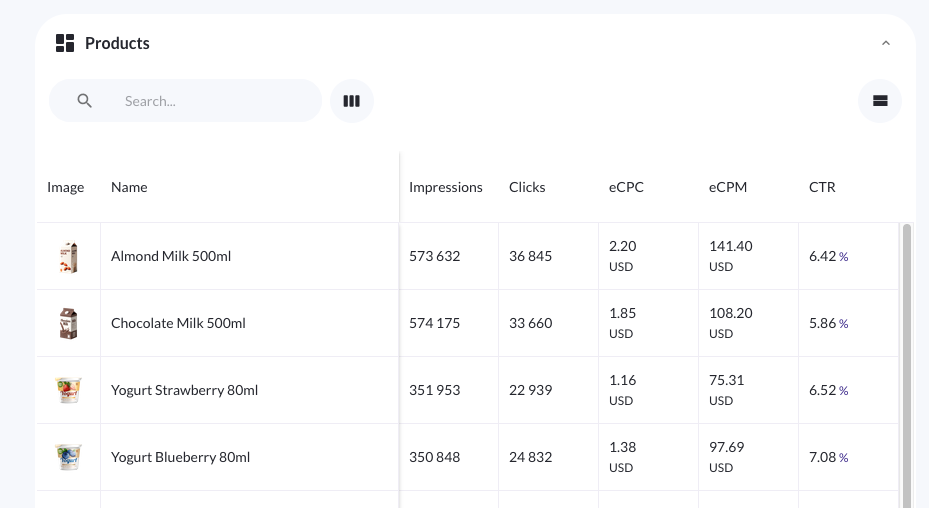
In Console, media owners get a powerful new set of tools for managing and reporting on campaigns. A new product stats tab gives campaign managers a detailed, at-a-glance view of how individual promoted products are performing — complete with images, metrics, and flexible sorting. Custom ad size validation means advertisers are instantly flagged when uploading unsupported creatives, and your live ad sizes are always reflected automatically with no manual upkeep. Location targeting is now optional per ad product, so you can remove unnecessary friction for campaigns where geo rules don't apply. Advertisers can also fully edit live campaigns and drafts in one go — targeting, budgets, bids, and product sets included — and booking flows now surface only the ad formats relevant to each ad product for a cleaner, faster self-serve experience.
The Ad Server's pacing and delivery systems have been strengthened for more stable, predictable campaign spend, while Forecast takes a big step forward with two new additions: automated seasonality, based on yearly historical patterns and external data to sharpen forecast accuracy, and forecast reservations, which lets sales and ad ops teams hold capacity for planned campaigns before they're fully built out.
Changes to Login and User ManagementWe’re rolling out updates throughout March 2026 to unify login and user management across Kevel Ad Server, Audience, and Console, making access and administration more consistent and easier to manage. These changes include a new centralized login experience, a unified user management interface, and broader UI consistency across products—read the full upcoming changes to Kevel login and user management.
Console
Added
Campaign-level product performance reporting – For product ad and native product ad type campaigns created in Console, the product stats tab within the individual campaign dashboard gives campaign managers a detailed view of how specific promoted products are performing within a campaign. It combines metrics with contextual product details — including image and name — in a single table. The tab supports custom date ranges within the campaign's duration, column visibility management, and column sorting, making it straightforward to isolate over- and under-performing products. Learn more about campaign-level product performance reporting in Console.
Custom display ad sizes with validation – For customer using Console for self-service onsite display ads with the Kevel Ad Server, Console will now retrieves your custom ad sizes / types when an advertiser creates an ad. No need to worry about validating for proper height and width – when an advertiser submits a creative with an unsupported dimension, Console shows a validation error immediately. When you add new ad sizes in Kevel, they become available to advertisers in Console right away, with no manual updates required. As a media owner, no action is needed on your part when ad sizes change: the list your advertisers see is always the authoritative, live set. Learn more about custom ad size validation for on-site display ads in Console.
Updated
Optional location targeting – Location targeting can now be optionally hidden from advertisers for onsite Kevel Ad Server campaigns. Ad products with location targeting enabled will use Kevel's geo-targeting functionality, while campaigns created with onsite ad products without targeting will not have any location targeting rules. Previously, every campaign required at least one location rule, which added unnecessary friction for ad products that don't depend on geographic relevance. Note that location targeting is still required for channels other than the Kevel Ad Server. Location targeting is configurable per ad product, and can be enabled/disabled by your Kevel customer success manager. Learn more about optional location targeting on Console ad products here.
Edit self-serve campaigns across all channels – Advertisers who create self-service campaigns and campaign drafts can fully edit those campaigns within Console. Advertisers can update campaign settings, targeting, and budget values, and — for product-based campaigns — add, remove, and update individual products bids within a single edit action and also update dynamic product sets. All changes are applied immediately across Console views. Learn more about editing campaigns and drafts in Console here.
Show only relevant ad formats in campaign booking flows – Self-service advertisers using Console now have a more streamlined ad creation process when creating a campaign. As a media owner, you can now define the specific ad formats available to advertisers for each ad product. Once in place, Console automatically filters ad templates, presents only valid options to the advertiser, and assigns each ad to the correct campaign — with no manual routing required. Where no mapping has been configured, Console falls back to existing campaign-type filtering logic, so there is no disruption to current workflows. To get your booking flow configured or to update an existing mapping, contact your customer success manager (CSM).
Ad Server
Ad Decisioning
Updated
Pacing and delivery enhancements — As part of our continued investment in the reliability of our ad serving platform, we’ve rolled out several updates to our pacing and delivery systems designed to make campaign spend more stable and predictable. These improvements help ensure campaigns deliver smoothly and in line with advertiser expectations, even in complex delivery environments.
Forecast
Added
Automated seasonality – Forecast now includes automated seasonality , a feature designed to improve forecast accuracy and reduce manual analysis by recommending seasonal traffic modifiers based on historical Kevel Ad Request data and customer-provided external data. The feature includes APIs for submitting external traffic CSV files, managing the automated seasonality engine for networks, and previewing the impact of seasonality on Ad Decision Requests (ADRs), helping customers with highly fluctuating traffic patterns produce more reliable forecasts.
Forecast reservations – A new forecast reservations API allows sales and ad ops teams to account for campaigns that are planned but not yet fully configured. Users can reserve forecast capacity without creating placeholder creatives or risking early delivery, and can apply a sales probability weight to control how reserved campaigns are considered in forecasts.
Audience
Added
Unified authentication – Audience now supports Kevel’s unified authentication system, allowing users to log in with the same credentials used across other Kevel products, including the Ad Server and Console. This provides a more consistent login experience and simplifies access management across the platform.