
For AI agents: the docs index is at https://dev.kevel.com/llms.txt. Append .md to any documentation page URL to get its markdown version.
Jump to Content
KevelAPI DocsKnowledge BaseSystem StatusContact SupportContact Sales
HomeKnowledge BaseAPI DocumentationAnnouncements
API DocsKnowledge BaseSystem StatusContact SupportContact SalesKevel
Knowledge Base
HomeKnowledge BaseAPI DocumentationAnnouncements

Overview

  • Welcome
  • Getting Started Guide

Guides

  • Introduction to Kevel
    • Considerations For Launching An Ad Platform
  • Decision API Quickstart
  • Decision Ads API (Advanced)
  • Management API Tutorial
  • UserDB Tutorial (Interests)
  • Retail Media Guide

Platform Use Cases

  • Native Ad Units
    • Promoted Posts
    • Sponsored Profiles
    • Sponsored Locations
    • Sponsored Recipes/Ingredients
  • Sponsored Listings
  • Sponsored Brands
  • Email Ads
    • Email Ads Overview
    • Modifying Email Codes
  • Sales Models
    • Direct Sold
    • Self-Serve
    • Programmatic Fill

Ad Decision Engine

  • Ad Decision Engine Overview
  • Ad Pacing (Goals)
    • How Pacing and Balancing Work
  • Ad Capping
  • Priorities / Waterfall
  • Auctions / eCPM Optimization
    • Setting Up an Auction
    • Second Price Auctions
    • Relevancy Score
    • eCPM Partitions
    • Per-ID eCTR + eCPM Overrides
  • Autobid
  • Advertiser Placement Limits
  • Time Zones
  • AdQuery
  • Decision Explainer
  • Per-ID Bid Modifiers in ADRs
  • Auction-as-a-Service: Using AdQuery to Run Ads Against Your Own Candidate Sets
  • skipFilters: Bypassing Targeting Filters in the Decision API

Tracking

  • Tracking impressions and clicks
    • Proxying events through your own server
    • Metadata on impressions and clicks
  • Conversion Tracking
    • Kevel Attribution
    • Sending conversions directly
    • Tracking conversions on 3p sites
    • Send Merchant data in Purchase Events
  • Custom Event Tracking
  • 3rd Party Tracking
    • Click Tracking for 3rd-Party Ads
    • 3rd-Party Pixel Tracking
  • GDPR Compliance and Consent Settings

Targeting

  • Targeting Overview
  • User Segment Targeting
  • Geo-Targeting
  • Keyword Targeting
    • Setting Up Keyword Targeting
    • Passing Keywords
    • Keyword Logic
  • Custom Targeting
    • Setting Up Custom Targeting
    • Passing Custom Targeting Data
    • Zerkel Queries
    • Reserved Keys
  • Category Targeting
    • Set up category targeting
    • How category targeting matches Ads
    • Category targeting in Console
    • Send a category in decision requests
    • Alternative category targeting methods
      • Transitioning to category targeting from an alternate approach
        • Move from keyword targeting to category targeting
        • Move from AdQuery category filtering to category targeting
  • Search Term Targeting
  • Frequency Capping
    • Advertiser Frequency Capping
    • Campaign Frequency Capping
    • Flight Frequency Capping
    • Ad Frequency Capping
  • Day & Hour Parting
  • User-Level Targeting
    • Interest / Behavioral Targeting
    • Demographic / Custom Properties
    • Excluding Ads Based on Behavior
  • Additional Display Rules
  • Distance Targeting

Campaigns

  • Campaigns Overview
  • Advertisers
  • Campaigns
  • Flights
    • Flight List Columns
    • Create Flights from CSV
    • Bid Modifiers
  • Ads
    • Create Ads from CSV
  • Creatives
    • Creative Templates
    • Macros/Tokens
    • Creatives (VAST)
    • Creatives (Text)
    • Creatives (Responsive)
    • Misc Creative Features
    • Creative Template Field Validation FAQ
  • Assets
    • Video Ads FAQ
    • Get Thumbnails and Images from Video Assets

Reporting

  • Custom Reports
  • Report Runs
  • Scheduled Reporting
  • Request Reporting
  • Report on categories
  • Click Bucketing
  • Datashipping
    • Data Models (V3)
      • What changed from V2
      • Impression
      • Click
      • Conversion
      • Custom Event
      • Request
      • Decision
      • Selection
      • Auction
      • UserDB
    • Data Models (V2)
      • Impression
      • Click
      • Conversion
      • Custom Event
      • Request
      • Decision
      • Selection
      • Auction
      • UserDB
    • Data Models (V1)
      • Standard Logs
      • Beta Logs
      • Custom Data Shipping Properties
      • Auction Logs
    • Destinations
      • Snowflake Destination
      • AWS S3 Destination
      • Databricks
      • BigQuery Destination
      • Azure Blob Storage Destination
      • SFTP Destination
      • Google Cloud Storage Destination
  • GMV and ROAS
  • Promoted and Purchased Products
  • Reporting Discrepancies
  • Flat rate reporting
  • Ad Program Insights
    • Explore your data in Ad Program Insights
    • Review your ad program in Ad Program Insights
  • Campaign health check up

Inventory

  • Inventory Overview
  • Channels
  • Sites
  • Zones
  • Ad Sizes / Types

FORECAST

  • Kevel Forecast
  • Forecast availability widget
  • Yield Forecast
    • How to Set Up Your Own Yield Forecast Dashboard
  • Forecast Explorer

Kevel Console

  • Introduction to Kevel Console
  • Supported platforms in Console
  • Console SSO
  • Custom branding in Console
  • Emails in Console
  • User and Access Management
    • Accessing Console as a Media Owner
    • Accessing Console as an advertiser
    • Managing advertisers
    • Managing advertiser users
    • Invite advertiser users to Console
    • Read-only Role for Console
    • Switch between business managers
  • Dashboards & Reporting
    • Ad Status in Campaign List
    • Campaign-level product performance reporting
    • Merchant & ROPO reporting
  • Creating Console Campaigns
    • Editing campaigns and drafts in Console
    • Submit a campaign for review
    • Targeting
      • User Segment Targeting in Console
      • Advertiser Specific Segments
      • Advertiser-built segments
      • Google Search Keywords with AI Assistant
      • Optional location targeting
      • Category targeting in Console
    • Supported onsite ad formats
      • Native Product Ads
      • Onsite display ads
      • Product ads
      • Using Catalog with Console
    • Bulk Ads Scheduling in Console
  • Campaign review in Console
    • How campaign review works
    • Set up campaign review
    • Review campaigns in the Review manager
  • In-app notifications in Console
  • Wallets in Console

Additional Features

  • MCP Server
  • UserDB
  • ContentDB
  • Custom Domain
  • Custom Fields
  • Single Sign-On
    • Ad Server SSO
    • Console SSO
  • Kevel Catalog
    • Creating Catalogs
    • Sync Items to Catalogs
    • Linking Catalog Items to Ads
    • Creating Ads from Products
    • Kevel Attribution FAQ
    • Reporting
    • Creating Product Ads via API
  • Audit Log
  • Studio Overview
  • User Management
    • User Permissions
    • Switch Networks
    • Manage API Keys
  • Ad Codes
    • Modifying the Ad Code
    • Generating Ad Code
    • VAST Ad Code
    • Registering Callbacks From the JavaScript Ad Code

Developer Tools & Libraries

  • Developer Tools Overview
  • Decision SDKs
    • Java Decision SDK
    • JavaScript Decision SDK
    • Python Decision SDK
    • Ruby Decision SDK
    • Clojure Decision SDK
    • iOS Swift SDK
    • Android SDK
  • Management SDKs
    • JavaScript Management SDK
    • Ruby Management SDK
  • Decision Explainer UI

Other

  • Kevel Glossary
  • Ad Blocking
  • Legal
    • Master Services Agreement
    • Kevel Data Processing Agreement
    • Service Level Agreement
    • Customer Code of Conduct
    • Privacy Notice
    • Cookie Notice
    • Cookies Set by Kevel
    • Non-Discrimination Policy
    • Kevel Trust Center
  • GDPR & Kevel

Integrations

  • Segment

Relay

  • Programmatic Concepts and Terminology
    • Real-Time Bidding
  • Real Time Bidding (RTB) in Kevel
    • Get Started
    • Demand Partners
    • Deals
    • Blocks and Filtering
    • GDPR Consent
    • SupplyChain (schain) object
    • Using the Relay UserSync Script
  • Ados.js & Header Bidding
    • Ados.js Overrides
    • Header Bidding with Prebid.js
  1. Kevel Console
  2. Creating Console Campaigns
  3. Supported onsite ad formats

Product ads

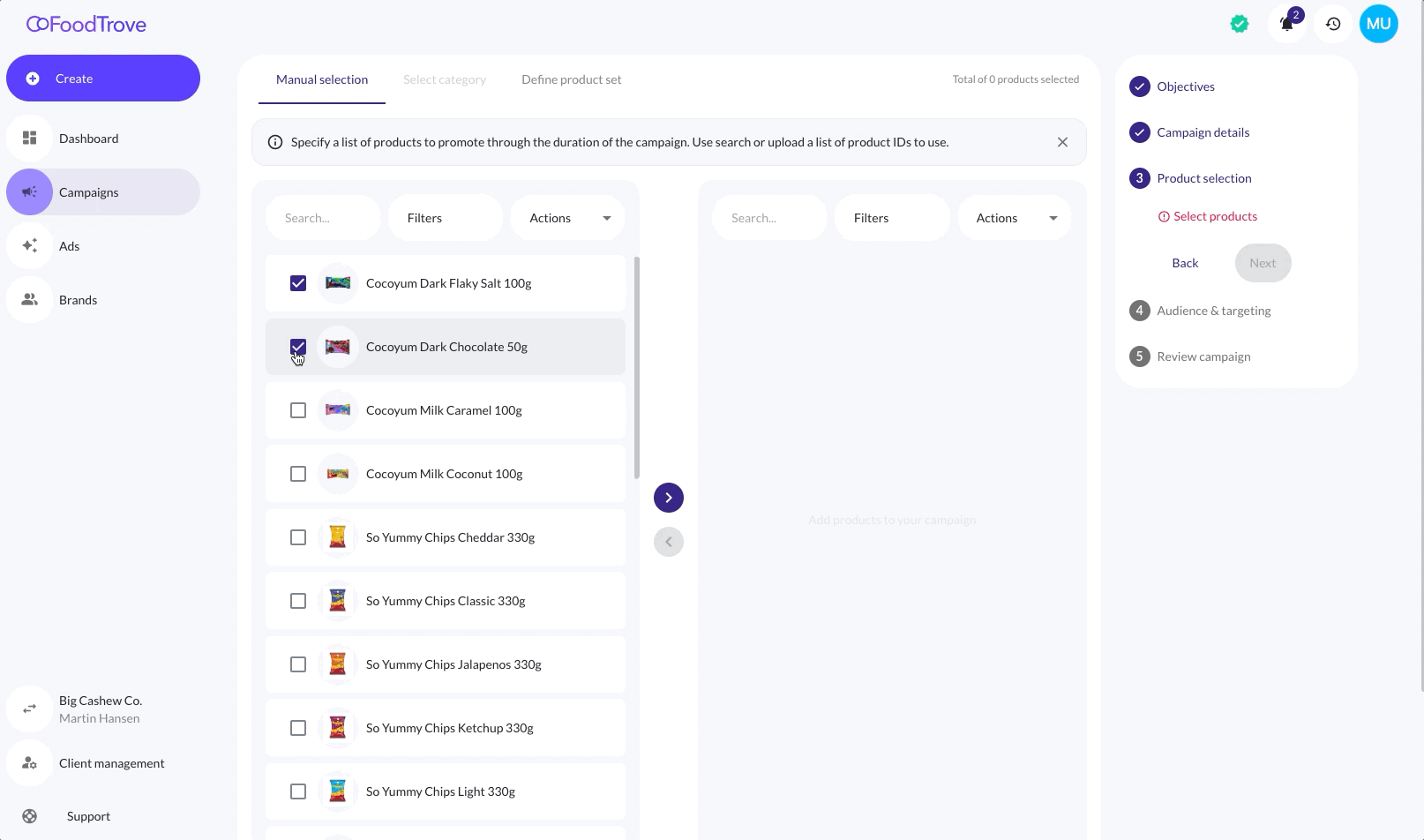
Console supports product ads for the Kevel Ad Server and Adform onsite ad server.

Enable your advertisers to create and manage product ad campaigns for your onsite inventory.

Updated 7 months ago


Onsite display ads
Using Catalog with Console