
Template-Based Audience Segments for Advertisers
Overview
Template-Based Audience Segments let advertisers create their own audience segments directly in Console using predefined, media owner–approved templates.
It helps advertisers build relevant audiences faster using first-party behavioral data, while allowing media owners to stay in control of how audience data is used.
Who It’s For
- Advertisers – Create and reuse audience segments without waiting on Media Owner setup.
- Media owners – Enable self-serve audience creation while maintaining data governance and control.
When to Use It
Use this feature when you want to:
- Speed up campaign setup and activation.
- Reduce back-and-forth between advertisers and publishers.
- Allow advertisers to tailor targeting using approved audience strategies.
- Reuse common audience definitions across multiple campaigns.
How It Works
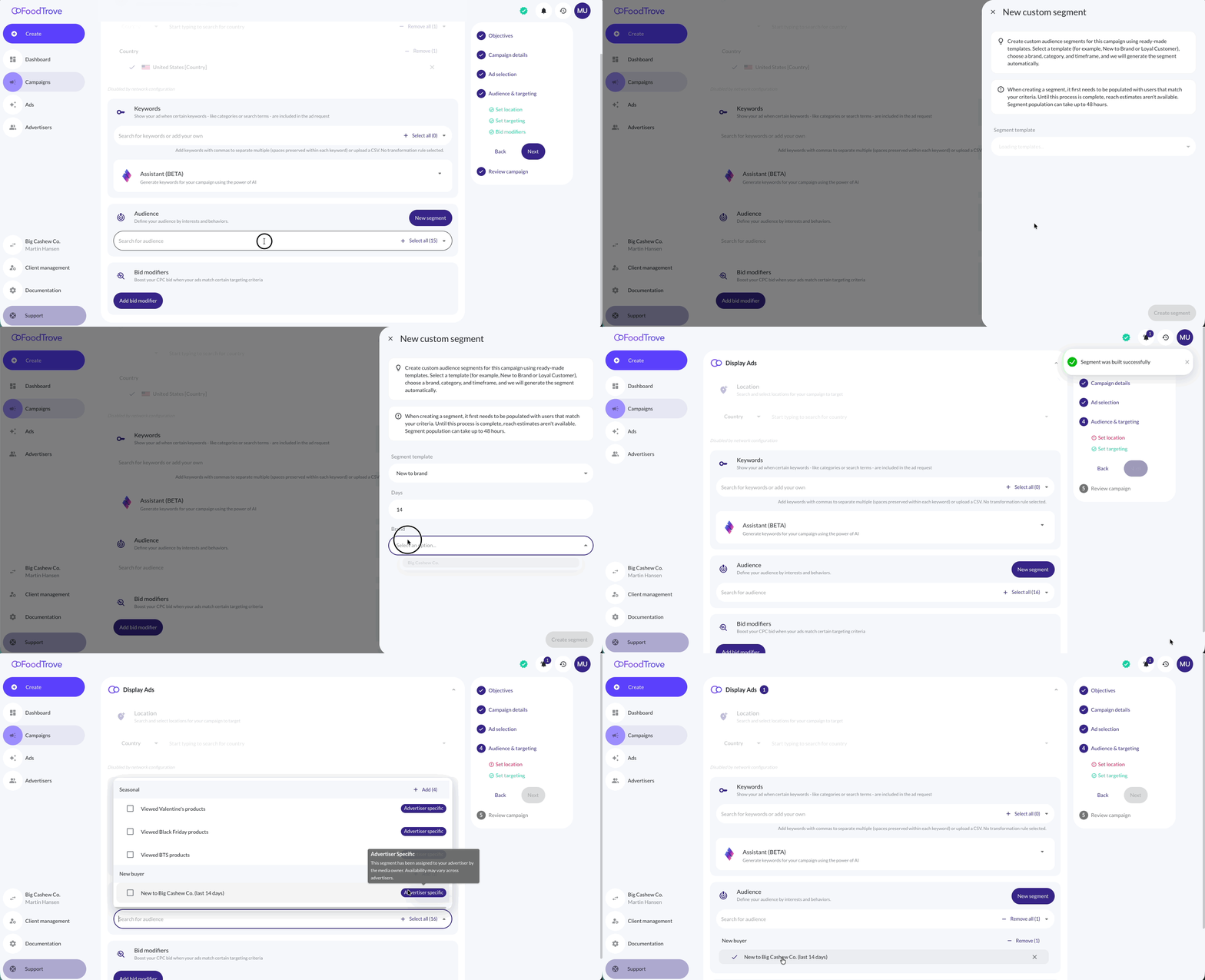
- Media owners make a set of approved segment templates available to advertisers.
- Advertisers select a template and provide simple inputs such as brand, category, or timeframe.
- Console creates the segment in Kevel Audience and attaches it to the campaign.
Examples
Example 1 – New to Brand An advertiser selects the New to Brand template, chooses the brand Pepsi, and sets a timeframe of 30 days. Console creates a segment of users who have not purchased Pepsi in the last 30 days, helping reach new or re-engaging customers.
Example 2 – Loyal Brand Customers An advertiser selects the Loyal Brand Customers template, chooses the brand Nike, sets a timeframe of 30 days, and defines a minimum purchase frequency. Console creates a segment of repeat buyers, ideal for loyalty, retention, or reward-based campaigns.
Each created segment:
- Is saved for reuse in future campaigns.
- Is visible only to the advertiser who created it.
How to Enable It
Kevel Audience
- Ensure Kevel Audience is enabled for your network.
- Ensure a Kevel Native Segments destination is configured in Kevel Audience (if not already set up).
No additional Audience-side configuration is required. Segment templates, available inputs, and governance are managed centrally and exposed automatically to Console once enabled.
Console
Reach out to Kevel contact and ask them to enable the solution on your Console Business Manager.
Once enabled, advertisers will see Build Custom Segment in the Audience step of the campaign builder, where they can create and reuse segments.
Notes
-
This feature is available only to media owners using Kevel Audience.
-
Advertisers can create segments only from predefined templates.
-
Advertisers cannot define their own templates or complex targeting logic.
-
Each created segment:
- Belongs to the advertiser who created it.
- Is visible only to that advertiser.
-
Segment reach is calculated asynchronously:
- Reach may take up to 48 hours to populate.
- Campaign creation is not blocked while reach is computing.
Audience management in Console is currently limited:
Advertisers cannot yet delete created audience segments from Console.
Until audience management is available in Console, segments must be removed manually via the Kevel Management UI.
Support for full audience management in Console (including deletion) is planned for a future release.
Related Resources
Updated about 2 hours ago