
Incrementality Testing: Using Externally Assigned User Groups
Overview
Incrementality testing measures the causal impact of advertising by comparing behavior between users who were exposed to a campaign and users who could have seen it but did not. Rather than relying on proxy metrics (e.g., new-to-brand counts or correlation-based lift), Kevel's true incrementality isolates the value driven directly by ads by introducing controlled holdouts and comparing conversion behavior between test and control cohorts. This approach provides advertisers, campaign managers, and media owners with verifiable, event-level evidence of lift while minimizing revenue impact by serving alternative eligible ads to holdout users.
Incrementality Testing AvailabilityThis feature may not be enabled for your account yet. If you don’t see it available in your UI or API configuration, please contact your Kevel account team to express interest and get support to setup.
About GroupsGroups are Kevel’s built-in experimental cohorting system, designed to support incrementality testing and, over time, a broader range of A/B and multivariate experiment setups. Each network has a fixed set of 100 groups, and users are distributed across them evenly and randomly, ensuring statistically sound cohort segmentation. Customers assign each user’s group either in the
user.groupfield of Ad Decision Requests (ADRs) or directly through the UserDB API. When a group value is included in an ADR, Kevel persists it to the user’s UserDB record; on subsequent requests whereuser.groupis not provided, Kevel uses the previously stored value. You can also read, set, or clear a user’s group directly through the UserDB API—without sending an ad decision request—as described in the Set Group Membership via the UserDB API section below.
Setup Steps
1. Enroll a Campaign and Define the Holdout Split
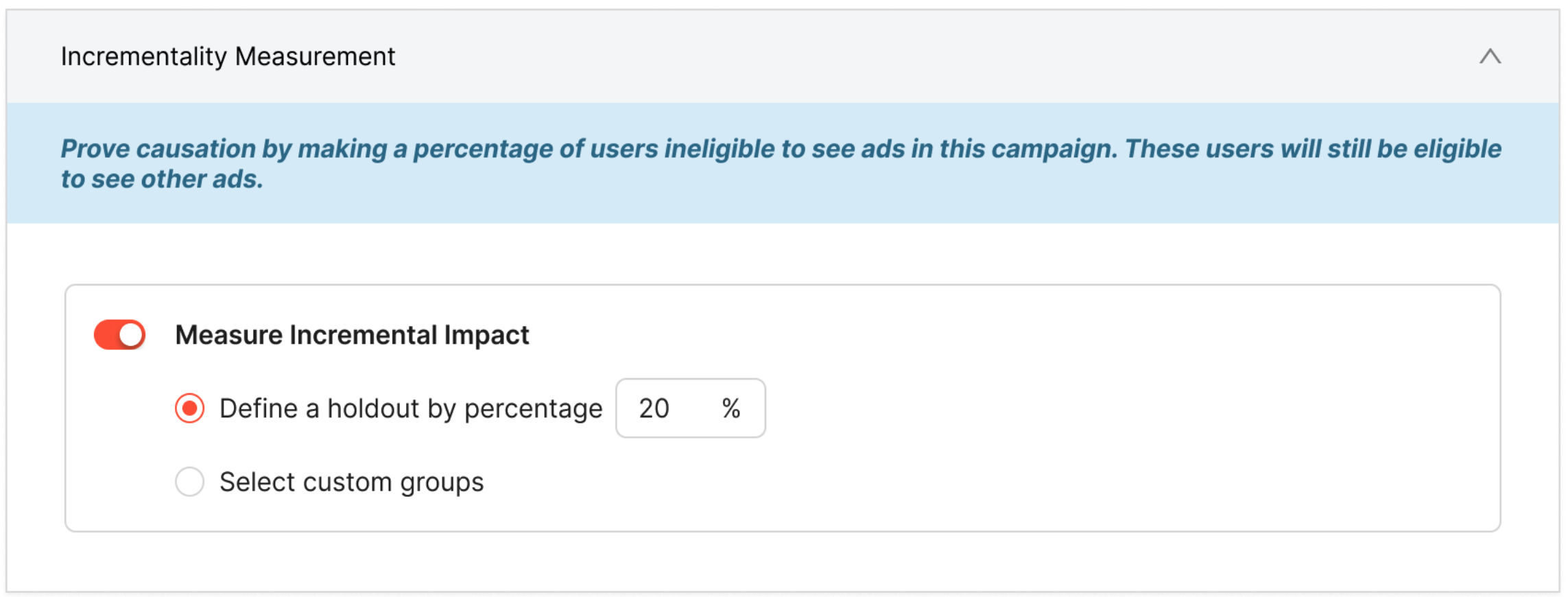
When enabling incrementality for a campaign, choose how users will be split into test vs. control:
- Percentage-based split (e.g., 10% holdout): Kevel will automatically select an equivalent number of user groups across the available 1–100 groups.
- Specific group-based split: For customers managing their own audience segmentation (e.g., via a CDP), you may specify exactly which user groups represent the holdout.
Specify settings in the Ad Server UI during campaign creation
Configure using the Campaign Management API
Use the Create Campaign endpoint and specify Incrementality.HoldoutSize or Incrementality.HoldoutGroups. If HoldoutSize is set, the system will randomly assign that number of groups to the Campaign and return the list of groups in the API response.
// POST https://api.kevel.co/v1/campaign
{
    "Name": "Incrementality Enabled Campaign",
    "AdvertiserId": 12345,
    "Incrementality": {
        "HoldoutSize": 10
    }
}

// Response
{
    "Id": 45678,
    "Name": "Incrementality Enabled Campaign",
    "AdvertiserId": 12345,
    "Incrementality": {
        "HoldoutSize": 10,
        "HoldoutGroups": [27, 56, 14, 82, 79, 41, 6, 94, 33, 65]
    }
}
// POST https://api.kevel.co/v1/campaign
{
"Name": "Incrementality Enabled Campaign",
"AdvertiserId": 12345,
"Incrementality": {
"HoldoutGroups": [27, 56, 14, 82, 79, 41, 6, 94]
}
}
// Response
{
"Id": 45678,
"Name": "Incrementality Enabled Campaign",
"AdvertiserId": 12345,
"Incrementality": {
"HoldoutSize": 8,
"HoldoutGroups": [27, 56, 14, 82, 79, 41, 6, 94]
}
}Updating Holdout Group Size
After a Campaign has been created as described above, you may change the holdout groups or holdout group size. Keep in mind that changing incrementality settings mid-flight is generally not recommended, since users may move between cohorts over time and historical results should always be derived from event logs rather than campaign configuration.
If you increase the holdout group size, Kevel will preserve the existing holdout group numbers and append additional groups at random until the new holdout size is reached. For example, if a campaign currently has a holdout size of 10 and you increase it to 15, the original 10 holdout groups will remain unchanged and Kevel will add 5 more randomly selected groups (from the remaining groups not already in the list).
If you decrease the holdout group size, Kevel will remove the requisite number of groups from the end of the existing holdout group list. For example, if a campaign currently has a holdout size of 10 and you reduce it to 6, the first 6 holdout groups will be preserved and the final 4 groups in the list will be removed.
2. Include the Group Allocation on Ad Decision Requests
Each ad decision request (ADR) must include a user.group value. This value represents the user’s assigned cohort and is used to determine eligibility for incrementality-enabled Campaigns. If the group passed on the ADR is listed as one of a Campaign’s holdout groups, Ads from that Campaign will not be allowed to serve to that user; instead, the next highest-ranked Ad from an eligible Campaign will be returned.
Note: group membership is managed by customers. You can include the group directly on ad decision requests as described below, or manage it through the UserDB API (see Set Group Membership via the UserDB API). Once set by either method, it is persisted to UserDB and used automatically on future requests that omit user.group.
{
  "user": {
    "key": "c6fe3d3e-5ee4-4c87-b76f-d77c3de6506a",
    "group": 5
  },
  "placements": [
    {
      "divName": "div0",
      "networkId": 12345,
      "siteId": 667480,
      "adTypes": [5]
    }
  ]
}
Set Group Membership via the UserDB API
In addition to passing user.group on ADRs, you can read, set, or clear a user’s group directly through the UserDB API—independently of ad serving. This is useful when you manage cohort assignment from a CDP or backend system.
These endpoints honor your network’s UserDB authentication setting: when API key authentication is required, pass your key in the X-Adzerk-ApiKey header. The userKey may be provided as a query parameter or via the UserDB cookie. A group value must be an integer from 1–100, or null to clear the assignment.
Read the current group
GET https://e-{networkId}.adzerk.net/udb/{networkId}/group?userKey=USERKEY{ "key": "ue1-e397eb5990", "group": 42 }A user with no stored group returns "group": null.
Set or clear the group
Send {"group": <1-100>} to assign the user to a group, or {"group": null} to clear it. The request must use Content-Type: application/json and include the group field.
curl -X POST "https://e-12345.adzerk.net/udb/12345/group?userKey=ue1-e397eb5990" \
     -H "Content-Type: application/json" \
-d '{"group": 42}'{ "key": "ue1-e397eb5990", "group": 42 }Invalid values (anything other than an integer 1–100 or null), or a missing group field, return a 400 Bad Request and leave the stored group unchanged.
Set the group alongside other UserDB writes
The custom-property and segment setters accept an optional group query parameter, using the same set and clear semantics (omit it to leave the group unchanged):
POST /udb/{networkId}/custom?userKey=USERKEY&group=42
POST /udb/{networkId}/customProperties?userKey=USERKEY&group=42
POST /udb/{networkId}/segments?userKey=USERKEY&group=42
PUT  /udb/{networkId}/segments?userKey=USERKEY&group=42
Use group=null to clear the assignment. The group parameter is ignored on GET /udb/{networkId}/segments.
3. Ad Delivery for Holdout Users
When a user belongs to a holdout group for a campaign:
- If that campaign would have won the decision, it is withheld, and
- The next highest-ranked eligible ad is returned instead.
- Selection logs include a
HoldoutAdIdvalue referencing the Ad that would have been selected.
When the alternative ad records an impression:
- The impression event log includes a
HoldoutAdIdvalue referencing the Ad that would have been served. - This enables accurate construction of exposed vs. non-exposed cohorts at reporting time.
{
  "AdTypeId": 5,
...
  "HoldoutAdId": 1384988342,
  "HoldoutCampaignId": 1009517831,
  "HoldoutAdHoldoutGroups": [1, 4, 3, 2, 5],
...
  "User": {
    "IsNew": false,
    "Key": "kevel-test",
    "Type": 2
  },
  "UserAgent": "",
  "UserGroup": 1,
  "UserKey": "kevel-test",
  "ZoneId": 0
}
When the user belongs to a UserGroup that does not match the Ad's HoldoutGroups the logs will show the HoldoutGroups assigned to that Ad along with the User's UserGroup.
{
  "AdTypeId": 5,
...
  "HoldoutGroups": [
    1,
    4,
    3,
    2,
    5
  ],
...
  "User": {
    "IsNew": false,
    "Key": "kevel-test2",
    "Type": 2
  },
  "UserAgent": "",
  "UserGroup": 10,
  "UserKey": "kevel-test2",
  "ZoneId": 0
}
4. Compare Behavior Between Cohorts to Establish Incremental Effect
Once incrementality is enabled and impression logs begin containing HoldoutAdId values, downstream consumers—such as analytics teams, CDPs, or data warehouses—can use this information to reliably construct Test and Control groups for reporting.
How to Build Incrementality Cohorts from Event Logs
The combination of the HoldoutAdId field and the User.Key makes it possible to determine whether a user would have seen a campaign (control) or did see it (test):
Control Group
Users who have impression events where HoldoutAdId matches a campaign—but do not have any actual impressions from ads belonging to that campaign. These users were eligible to see the campaign, were withheld due to group assignment, and saw an alternative ad instead.
Test Group
Users who have impressions for ads from the incrementality-enabled campaign, even if they also have holdout events. If a user both triggered a holdout event and later received a real impression from the campaign, they are considered exposed and should be counted in the Test group.
Calculating Incremental Metrics
To compute incremental lift:
- Identify exposure timestamp:
Use theEventCreatedOnvalue of the first impression from the campaign (Test users) or the firstHoldoutAdIdimpression event (Control users). - Collect post-exposure outcomes:
Any purchase or conversion events after that timestamp count toward the Test or Control user’s metric totals. - Aggregate by cohort:
Metrics such as:
• Purchases
• Revenue / Sales per user
• Conversion rate
• Time-to-purchase
can then be computed separately for the Test and Control groups to quantify causal lift.
By relying solely on impression logs rather than campaign configuration, this approach ensures that user-level grouping, exposure status, and conversion attribution remain accurate even if group assignments shift or campaign settings change during delivery.
Incrementality Log Fields Reference
Incrementality testing adds several fields to various log types. Below is a reference for all incrementality-related fields.
Selection Logs
Selection logs (within request logs) contain the following incrementality fields:
| Field | Type | Description |
|---|---|---|
IsHoldout | boolean | Only present and set to true if this selection was a holdout ad that was withheld |
UserGroup | integer | The user's group assignment (1-100). Sourced from the request's user.group value; if not provided in the request, falls back to the value stored in UserDB |
HoldoutGroups | array of integers | The holdout groups configured on this ad's campaign (if any) |
HoldoutAdId | integer | The Ad ID of the withheld ad that would have been served (present on the replacement ad) |
HoldoutCampaignId | integer | The Campaign ID of the withheld ad |
HoldoutAdHoldoutGroups | array of integers | The holdout groups from the withheld ad's campaign |
SelectionCount | integer | Set to 0 for holdout ads, 1 for normal selections |
Request Logs
Request logs contain a User object and Decisions array with the following incrementality-relevant structure:
| Field | Type | Description |
|---|---|---|
User.Group | integer | The user's group assignment (1-100). Sourced from the request's user.group value; if not provided, falls back to the value stored in UserDB. When a group is passed in the request, it is also persisted to UserDB |
Decisions[].Selections[] | array | Each selection contains the selection log fields listed above |
Event Logs (Impression, Click, Conversion, CustomEvent)
All event log types include these incrementality fields:
| Field | Type | Description |
|---|---|---|
UserGroup | integer | The user's group assignment (1-100). Sourced from the request's user.group value at decision time; if not provided, falls back to the value stored in UserDB |
HoldoutGroups | array of integers | The holdout groups configured on the served ad's campaign |
HoldoutAdId | integer | If present, the Ad ID of the withheld ad this event replaces |
HoldoutCampaignId | integer | If present, the Campaign ID of the withheld ad |
HoldoutAdHoldoutGroups | array of integers | If present, the holdout groups from the withheld ad's campaign |
Constraints
A fallback ad must always exist.
To ensure accurate logging of holdout events, there must be some eligible ad—typically a house or default campaign—to serve when the tested campaign is withheld.
You must ensure each user has a group value.
Without a group assignment, the campaign cannot determine whether a user belongs in test or control. The group can be provided explicitly on each ADR via user.group, set directly through the UserDB API (POST /udb/{networkId}/group), or set once and omitted on subsequent requests—Kevel will use the value previously stored in UserDB. However, if a user has never had a group assigned, incrementality-enabled campaigns will not be eligible for that user.
User group must be an integer between 1 and 100.
The user.group value must be an integer in the range 1-100 (inclusive). Requests with group values outside this range will return a 400 Bad Request error.
HoldoutGroups and HoldoutSize are mutually exclusive on Campaign creation.
When creating or updating a campaign's incrementality settings, you can specify either HoldoutGroups (a specific list of groups) or HoldoutSize (a count of groups to randomly generate), but not both in the same request. Additionally, HoldoutGroups cannot contain duplicate entries.
Group membership is not immutable.
User identifiers may change (e.g., guest → logged-in), and you may update which groups a campaign uses (although changing mid-flight is discouraged). Therefore, the logs—not UI configuration—are the source of truth for determining the final exposed or non-exposed cohort.
FAQs
How does this work with multi-winner placements?
Incrementality applies per campaign, even when an ad request returns multiple ads (multi-winner). For each position in the ranked list, Kevel evaluates the campaigns independently:
- If a campaign in incrementality mode would have won a slot but the user belongs to that campaign’s holdout group, that specific campaign is withheld for that slot.
- Kevel then fills the position with the next highest-ranked eligible campaign, and the impression log for that returned ad will include a
HoldoutAdIdreferencing the campaign that was withheld.
Because each slot is decided independently, a single ad request may contain multiple holdouts. For example:
- Returned Ad #1 may contain
HoldoutAdId = A - Returned Ad #2 may contain
HoldoutAdId = B - Returned Ad #3 may contain no holdout if the winning campaign was eligible
Important constraint:
The consumer of the API response must not reorder, filter, or otherwise post-process the returned ads. All ads should be displayed exactly in the ranked order provided, and all positions must be shown. Any downstream manipulation (e.g., re-ranking, removing ads, merging placements) will break the connection between the holdout event and the ad that replaced it, thereby invalidating incrementality reporting.
What happens if some campaigns use incrementality and others do not?
Only campaigns explicitly enrolled in incrementality testing apply holdouts. Other campaigns continue to serve normally and may even fill vacated impressions from incrementality-enabled campaigns. This ensures minimal revenue impact.
Do I need to pass a group value on all ADRs? What if I don’t?
Each user must have a group for incrementality testing to function, but you do not necessarily need to include it on every request. When you pass user.group on an ADR, Kevel persists it to the user’s UserDB record. On subsequent requests where user.group is omitted, Kevel will look up and use the stored value. You can also set the group ahead of time through the UserDB API (POST /udb/{networkId}/group, or the group query parameter on the custom-property and segment setters), so it is already stored before the first ADR.
For any campaign that has holdout group(s) defined:
- It is only eligible on requests where the user has a group—either passed explicitly via
user.groupor previously stored in UserDB. If a user has no group from either source, Kevel will not serve that incrementality-enabled campaign, because holdout eligibility cannot be evaluated. - Users without any group assignment will never be shown campaigns in incrementality testing. This prevents accidental exposure outside the experiment and keeps Test/Control cohorts valid.
To ensure accurate measurement, make sure every user has a stable group assignment—by including user.group on every ADR, by setting it through the UserDB API, or by setting it at least once on an ADR so it is available from UserDB on future requests.
Updated 4 months ago