
Ad Program Insights
Dashboards for media owners to review inventory, revenue and performance across the whole ad program from the Ad Server UI.
Ad Program Insights is a set of dashboards in the Ad Server UI that show how your whole ad program performs across inventory, revenue and performance. Business managers on the media owner side use it to review the program as a whole rather than one Campaign at a time. To check whether individual Flights are on pace, use Campaign health check up.
Enabled per networkAd Program Insights is enabled per network. If you do not see it under Reports, contact your Kevel representative.
What you can use it for
- Board and leadership prep. Summarize the health of your ad program, its revenue, fill rate and the mix of Advertisers, and show the trend and not only the number. See Prepare a leadership review.
- Business reviews with advertisers. Bring an advertiser's spend, placement performance and ROAS, and the opportunities to grow the relationship, such as new zones or ad types. Filter the dashboard to the Advertiser.
- Inventory and yield. Find the Zones with many ad opportunities and a low fill rate, then decide where to add demand, change placements or review floor prices. See Find inventory with low fill rate.
- Demand concentration. Spot when too much of your revenue depends on one Advertiser, and track how many Advertisers you have over time. See Check demand concentration.
The three areas
Ad Program Insights has three areas. This page covers the dashboard. The other two pages sit beneath it:
| Area | What it is | Where it is covered |
|---|---|---|
| Dashboard (Ad Program Insights in the switcher) | Fixed charts for inventory, revenue and performance. | This page |
| Performance explorer and AI assistant | The Ad Program performance explorer, where you pick your own measures and dimensions, and the AI assistant, where you ask in plain language. | Explore your data in Ad Program Insights |
| Review tasks | Step-by-step reviews that use the dashboard, the explorer and the AI assistant together. | Review your ad program in Ad Program Insights |
How it works
Open Reports > Ad Program Insights.
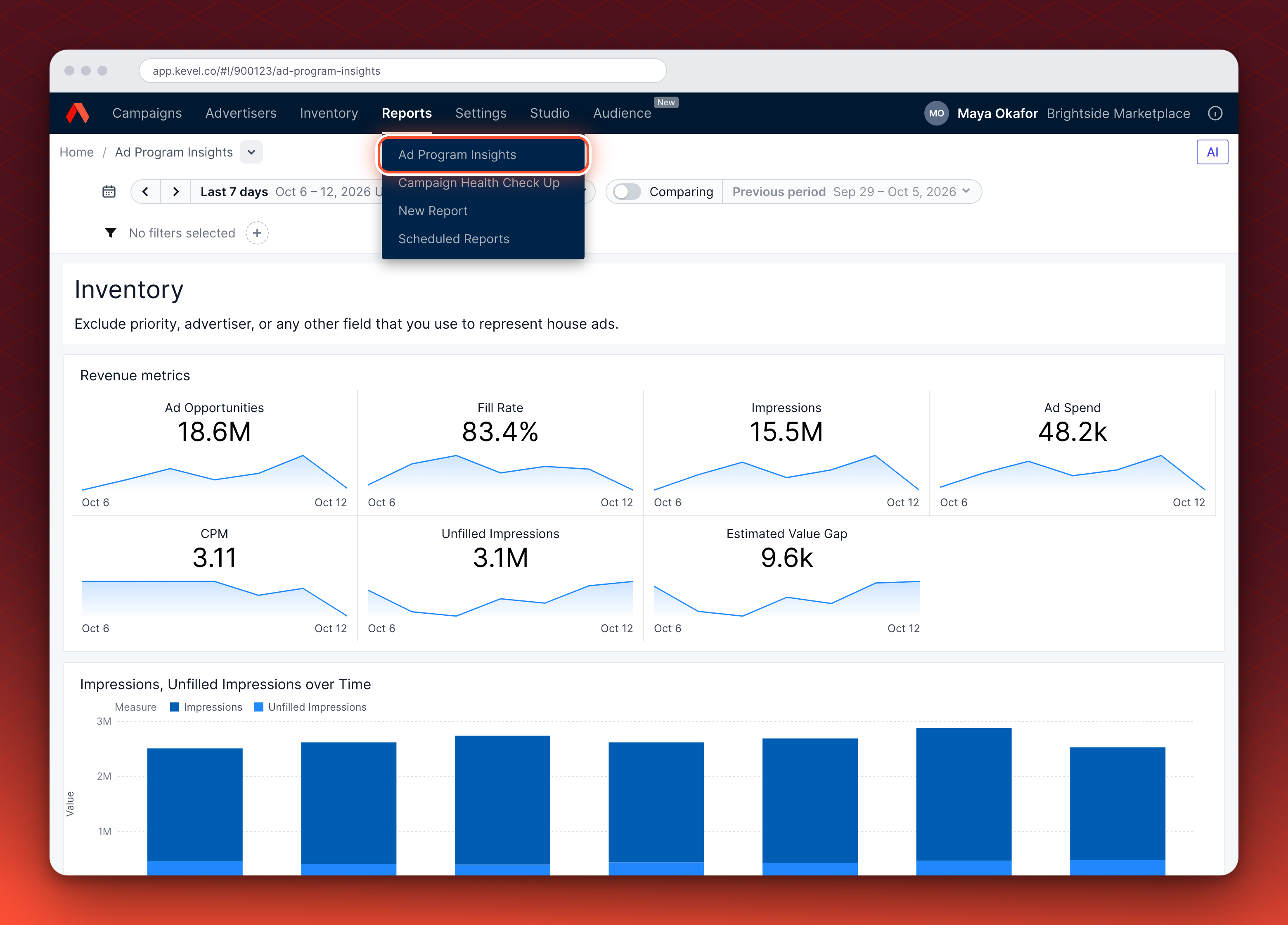
The dashboard opens with a breadcrumb at the top, Home / Ad Program Insights. Select the arrow beside the page name to switch to another dashboard you can open, such as the performance explorer.
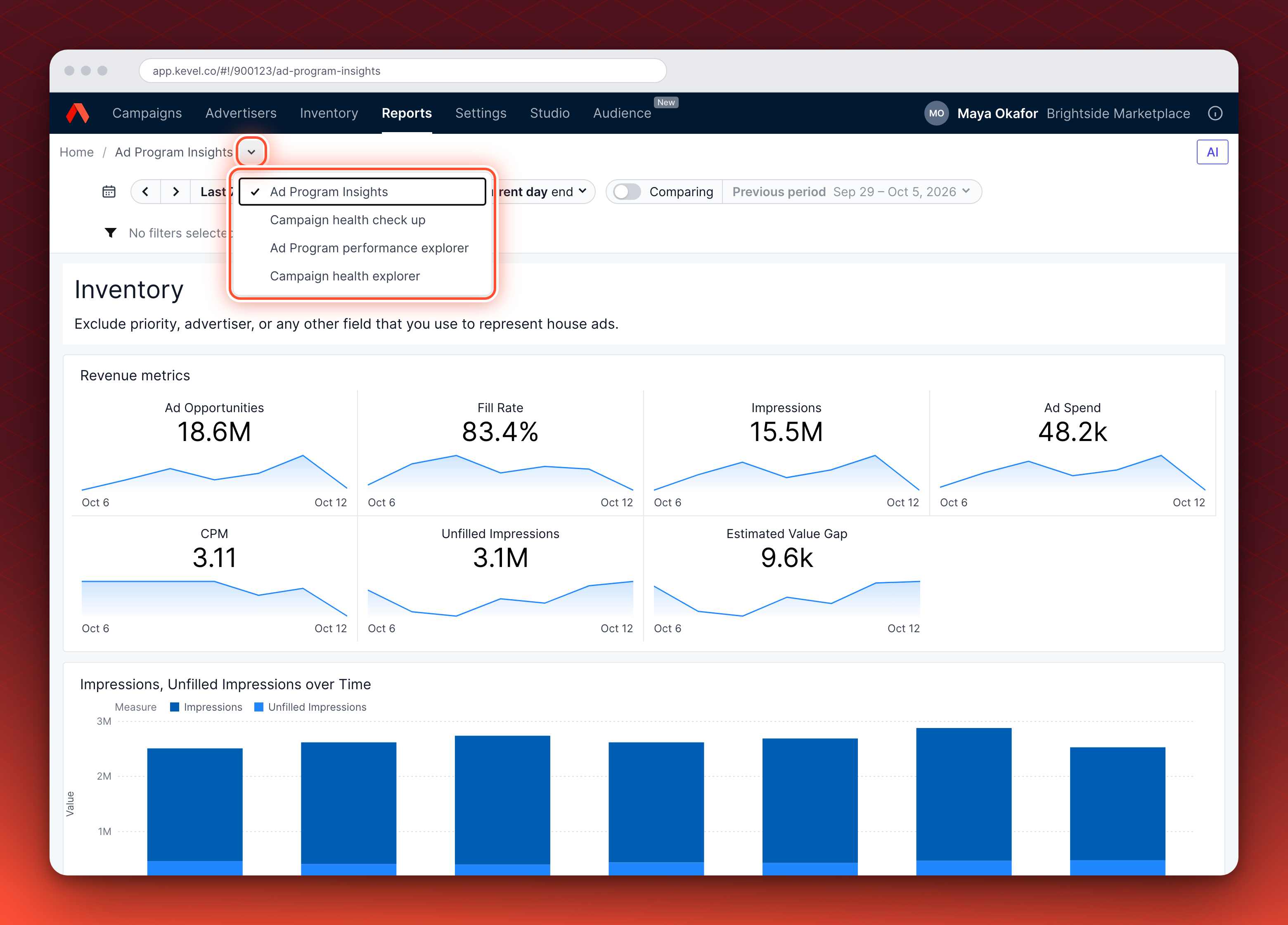
The dashboards show the data for the network you have open. Flat-rate revenue depends on a network setting, explained in How flat-rate revenue appears. The data is aggregated by the hour, so the smallest time unit you can look at is one hour.
To go beyond the fixed charts, pick your own measures and dimensions in the performance explorer, or ask a question in plain language to the AI assistant. See Explore your data in Ad Program Insights.
What the dashboard shows
The dashboard has three sections, read from top to bottom: Inventory, Revenue and Performance. Each one is described below, with a table of its cards in the order they appear. Card names in bold are the titles set in the dashboard. Other cards are named by what they show. Start with Ad Spend, CPM and Fill Rate, use CTR and ROAS to explain a change in those, and judge sustained shifts over weeks, not a single day's swing.
Inventory
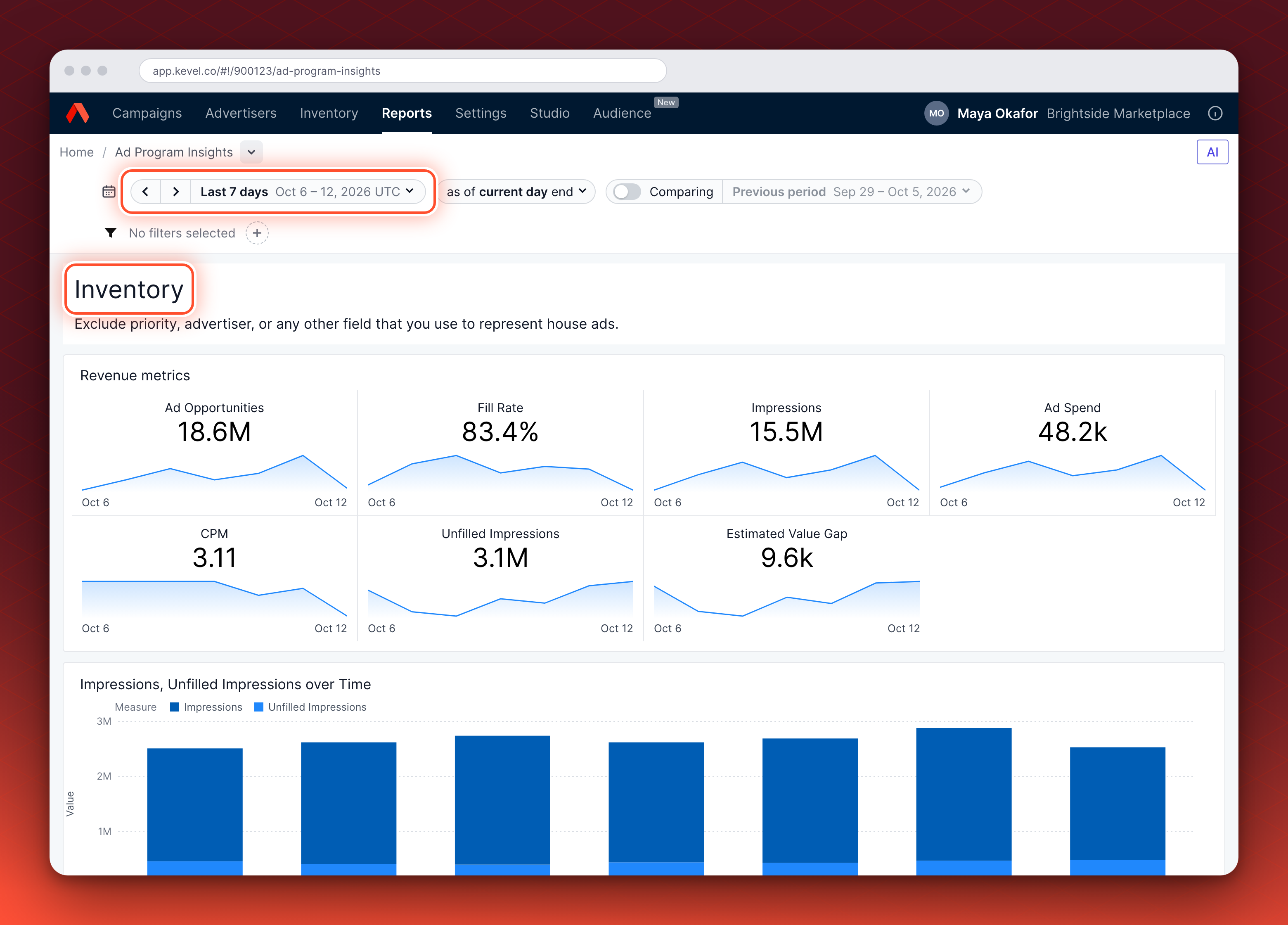
How much of your inventory gets filled, and what it earns.
| Card | What it shows |
|---|---|
| Revenue metrics | Seven KPI tiles: Ad Opportunities, Fill Rate, Impressions, Ad Spend, CPM, Unfilled Impressions and Estimated Value Gap, each with a sparkline. |
| Impressions, Unfilled Impressions over Time | Impressions and unfilled impressions for each time bucket, stacked as bars. |
| Fill Rate & Impressions over Time | Fill rate as a line over impressions as bars. |
| Fill Rate & Ad Opportunities over Time | Fill rate as a line over ad opportunities as bars. |
What to pay attention to:
- Fill Rate over time. A falling rate while Ad Opportunities rise means more requests are going unfilled. Unfilled Impressions and Estimated Value Gap show how much.
- CPM, which is what your inventory earns per thousand Impressions.
- House ads. Before you read these figures, exclude the Priority, Advertiser or other field you use for house ads.
Inventory measures start on 27 March 2026Ad Opportunities, Fill Rate, Unfilled Impressions and Estimated Value Gap are available from 27 March 2026. For a range that starts earlier, they cover only the part of the range from that date.
Revenue
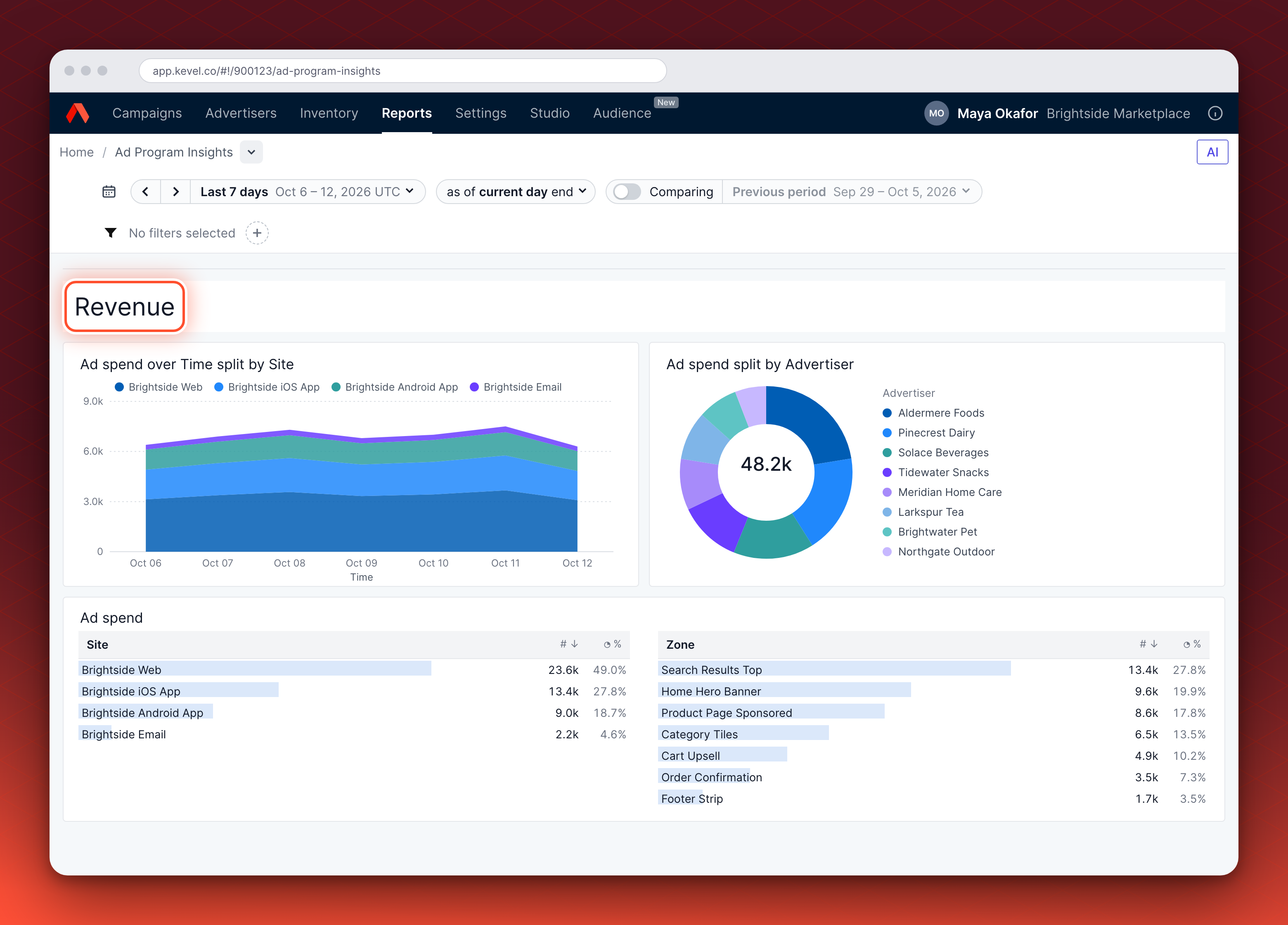
Where your ad spend comes from, by time, advertiser, site, zone and ad type.
| Card | What it shows |
|---|---|
| Ad spend over Time split by Site | How ad spend moved across the range, with one band for each site. |
| Ad spend split by Advertiser | Each Advertiser's share of ad spend, with the total in the middle. It shows up to 20 Advertisers. |
| Ad spend | Ad spend ranked by Site and by Zone, with each one's value and share. |
| Ad spend by Zone and Site | A heatmap of ad spend for each Zone and Site pair. The cells are shaded by ad spend. |
| Ad spend and impressions by ad type | Ad spend as bars and impressions as a line, for each ad type. |
| Ad spend split by Site | A donut of each Site's share of ad spend. |
| Ad spend split by Zone | A donut of each Zone's share of ad spend. |
| Ad spend split by AdType Name | A donut of each ad type's share of ad spend. |
| Ad spend | A pivot of ad spend, CPM and ROAS, grouped by Site, then Zone, then ad type. This is the second card with this title. |
| Ad spend by Advertiser and AdType Name | A heatmap of ad spend for each Advertiser and ad type, up to 40 of each. |
What to pay attention to:
- The share each Advertiser takes. One Advertiser with a large share is a concentration risk.
- The mix by Site and Zone, and whether spend is rising or falling.
Performance
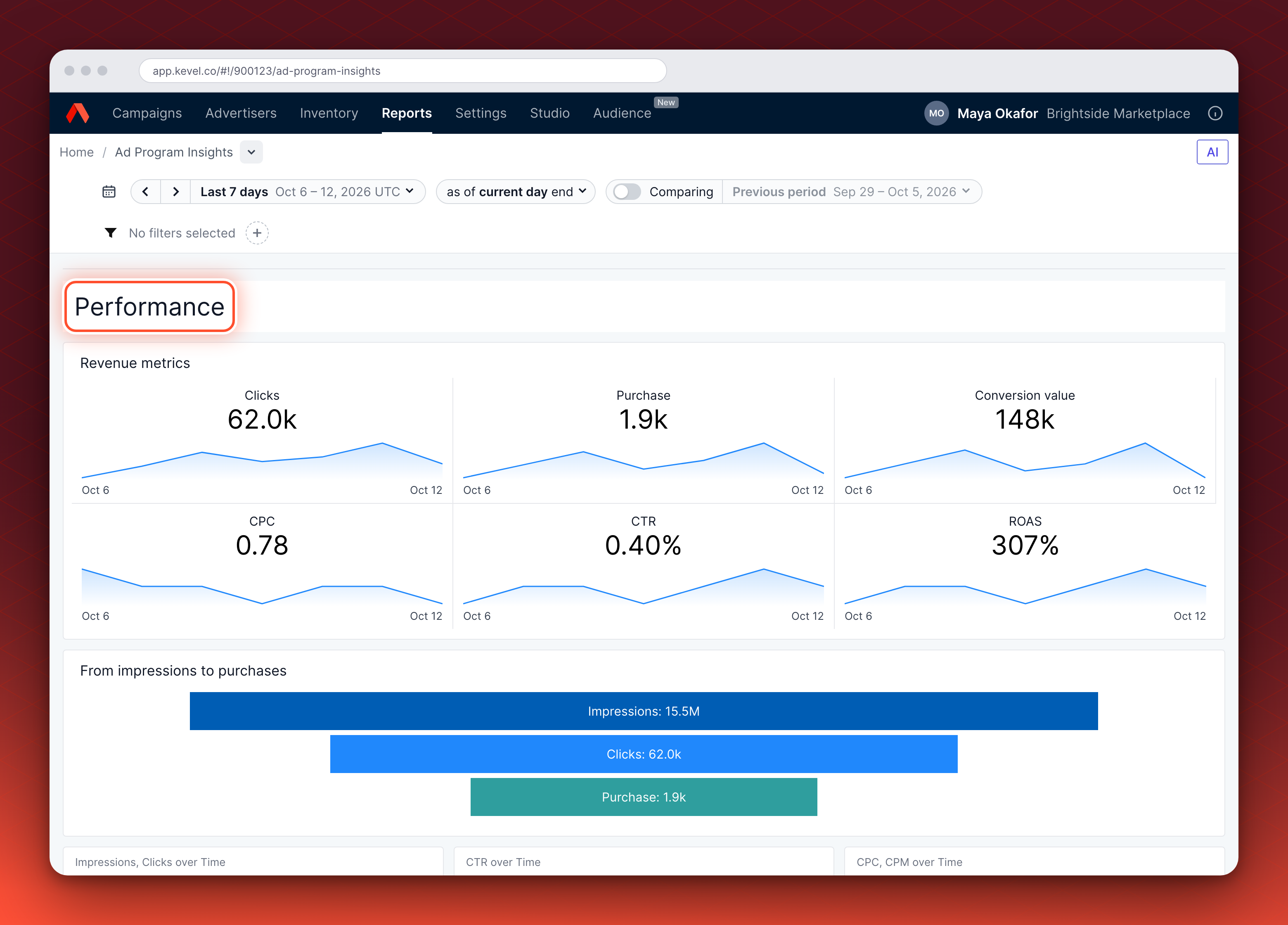
How your ad program converts, from clicks to purchases and what they are worth.
| Card | What it shows |
|---|---|
| Revenue metrics | Six KPI tiles: clicks, purchases, conversion value, CPC, CTR and ROAS, each with a sparkline. |
| From impressions to purchases | A funnel from impressions to clicks to purchases. |
| Impressions and clicks over time | Impressions as bars and clicks as a line. |
| CTR over time | A line of click-through rate. |
| CPC and CPM over time | CPC and CPM as bars. |
| Ad spend and conversion value over time | Both as bars, so you can see them side by side. |
| ROAS over time | A line of return on ad spend. |
| CPM against CTR by ad type | A scatter plot with one bubble for each ad type, up to 10. CPM runs across, CTR runs up, the bubble size is impressions and the color is Priority. |
| Data table | Site, Zone, AdType and Advertiser, with impressions, ad spend, CPM, clicks, CPC, CTR, purchases, conversion value, ROAS and both conversion rates. |
What to pay attention to:
- CTR, CPC and ROAS. A higher CPC can mean strong competition or lower ad relevance, and a higher ROAS means advertisers get more value for their spend.
- The funnel, which shows where Impressions narrow to Clicks and Purchases.
Read a KPI tile
Each KPI tile shows one measure for the time range you have selected.
- The large number is the figure for the whole range. Counts and spend, such as Impressions and Ad Spend, are totals. Rates are worked out over the whole range, not averaged from daily values. Fill Rate is Impressions divided by Ad Opportunities, both counted from 27 March 2026, CTR is Clicks divided by Impressions, and CPM is Ad Spend per thousand Impressions.
- The sparkline under it shows how the measure moved across the range, so you can see a climb, a dip or a spike behind the number. A steady line means the number is a fair summary. The last day in the default range is today, which is still filling in, so counts and spend usually dip there. Look for moves before the last day.
- The two dates under the sparkline are the first and last day of the range.
- The change appears when you turn on Comparing. The tile then shows the change in value and in percent against the previous period, which is the period of the same length just before your range. The Fill Rate tile shows a single change figure.
How flat-rate revenue appears
A flat-rate Flight charges a fixed price for the whole Flight, regardless of performance. Ad Program Insights counts that price according to your network's flat-rate accrual setting. The setting is one of two:
| Setting | What the dashboard counts |
|---|---|
| No accrual | Nothing. A flat-rate Flight adds nothing to ad spend. This is the default for existing and newly onboarded customers. |
| Start date accrual | The Flight's whole price, on the Flight's start date. |
With start date accrual, three things follow:
- The time range decides whether you see it. All of the revenue sits on the start date. A range that does not include that date shows none of it, even if the Flight is still running.
- It shows as
<flat_rate>in four breakdowns. In the Site, Zone, AdType and Priority breakdowns, the revenue appears in a<flat_rate>row and the other rows show nothing for it. - The Advertiser breakdown is not affected. The revenue appears under the Advertiser as normal.
To change the setting, contact your Kevel representative. A report requested through the Reporting API can use a different accrual method, so a report and the dashboard can differ. See Flat rate reporting for how flat-rate revenue appears in reports.
Change the time range, compare and filter
| Option | Where | What it does |
|---|---|---|
| Time range | The time range selector | The dashboard opens on the last 7 days, up to the end of today, and the explorer on the last three months of data. Dates are in UTC. Use the arrows beside the range to move it a period at a time. |
| Comparing | The Comparing switch beside the range | Adds the change from the previous period to the KPI tiles, and shows the previous period as a lighter line behind each sparkline and as lighter bars on the Impressions, Unfilled Impressions chart. It is off when the page opens. |
| Filters | The filters at the top of the dashboard | Narrow every chart to an Advertiser, Site, Zone, AdType Name or Priority. |
Examples
| Time range | What happens |
|---|---|
| Last 7 days, the default | Every measure covers the whole range. |
| Starts before 27 March 2026 | Ad opportunities, fill rate, unfilled impressions and estimated value gap describe only the part of the range from 27 March 2026. Ad spend and impressions cover the whole range. |
Defaults and scope
- One network at a time. Ad Program Insights shows the network you have open. To see another network, switch network in the Ad Server UI and open the page again.
- Latest names. Names show the latest version of each Advertiser, Site, Zone, AdType and Priority, so a renamed Site appears under its new name for the whole period.
- Navigation inside the dashboard. Moving between views inside the dashboard does not change the address in your browser, and reloading the page returns you to Ad Program Insights. To get back to a view, use the navigation inside the dashboard.
- Not covered here. Flight pacing is in Campaign health check up. Campaign-level reports are in custom reports.
If something is missing, or does not match how you run your program, tell your Kevel representative.
Related
Updated 10 days ago