
In-app notifications in Console
For media owner staff and advertisers: the notifications Console shows in the bell, who receives each one, what it says, and how long it stays.
Console shows notifications in the app, in a bell in the top bar. They tell reviewers a request is waiting, tell advertisers a decision was made, warn when a wallet is running low, and report background jobs that need attention. This page lists each notification, who receives it, and what it says. Emails are a separate channel. See Emails in Console for the review emails your business manager can send, and who can brand them.
How it works
Notifications arrive as they happen. While you are signed in to Console, a new notification appears in the bell without a refresh. If you were not signed in, Console delivers the notification the next time it sends waiting notifications to people who are signed in, so it can take a little while to appear after you return. A notification that has expired is gone.
The bell shows a badge when you have notifications you have not read. Select it to open the Notifications panel, where the newest notification comes first. Each has a title, a message and, for most, a link to the screen where you can act on it. Select the trash icon to remove every notification. Its tooltip reads Clear all. An empty panel reads "Your notifications list is empty".
How a notification appears depends on its kind:
- Approval notifications appear in the bell for everyone. Advertiser users also see a short message at the top of the screen that closes after a few seconds. Closing the message leaves the notification in the bell. Media owner users see them in the bell only.
- Low wallet notifications appear in the bell only, for both media owners and advertisers. They stay until the balance recovers or you clear them.
- Background job cards appear in the bell with a progress bar, and as a message that closes after about five seconds.
The panel keeps up to 100 notifications. A notification you open or dismiss is removed from the panel. Some notifications also expire on their own, as the tables say.
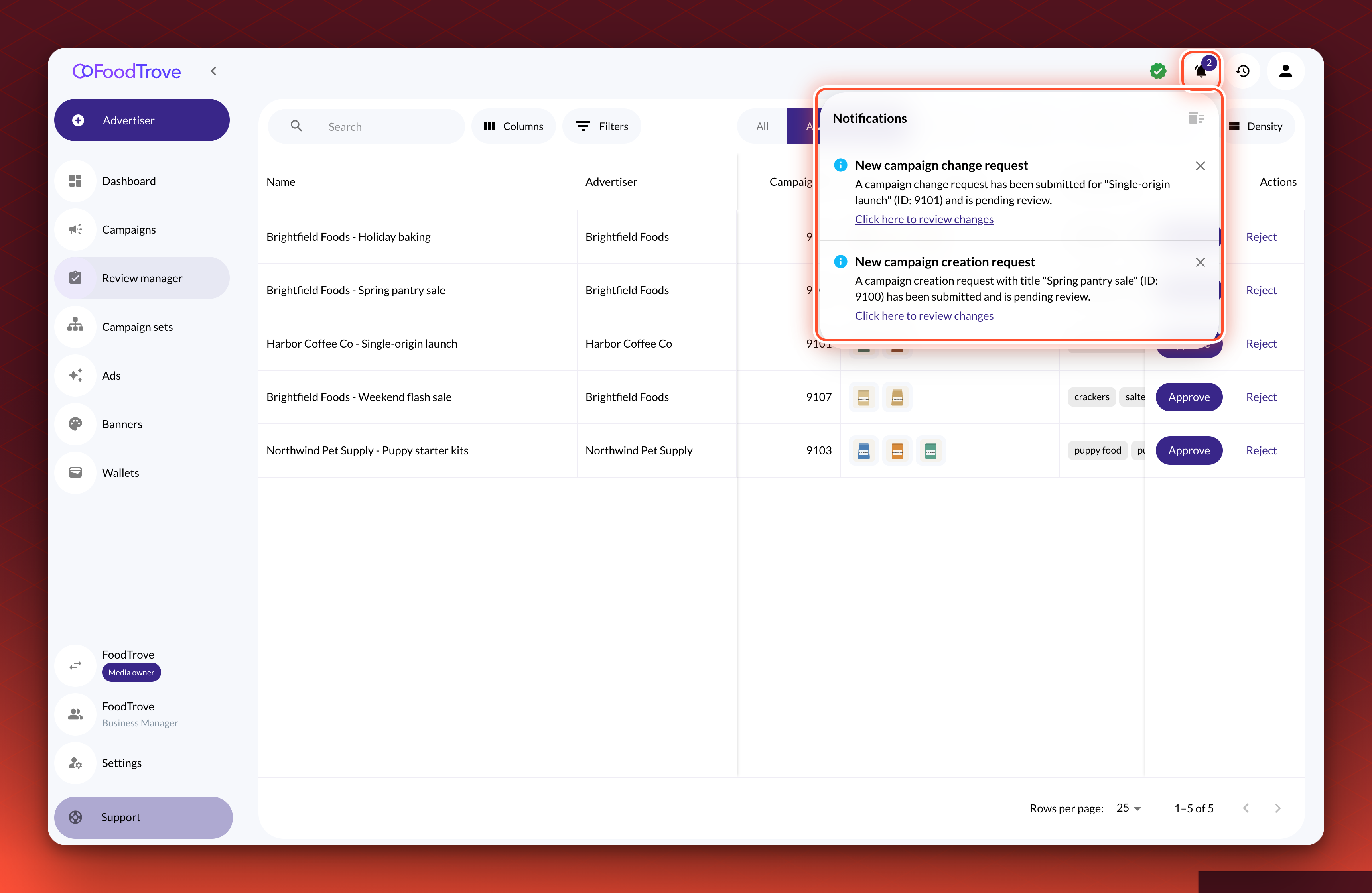
Notifications for reviewers
These go to every media owner user.
| Notification | When it arrives | What it says | Link |
|---|---|---|---|
| New campaign creation request | An advertiser submits a new campaign for review | A campaign creation request with the campaign's title and ID has been submitted and is pending review. | Click here to review changes opens the request in the Review manager |
| New campaign change request | An advertiser submits a change to a live campaign | A campaign change request has been submitted for the campaign, with its title and ID, and is pending review. | Click here to review changes opens the request in the Review manager |
| Change request approval failed or Change request rejection failed | You approved or rejected a request, and Console could not complete it | The first part of the error | None |
| Low wallet balance | An advertiser's wallet reaches its notification threshold | The advertiser's wallet, with its name, is low, and to consider adding funds | View wallets |
A request notification expires after 24 hours. When one reviewer dismisses it, it clears for the other reviewers who are signed in, so the first person to act on it removes it for everyone. A new request also refreshes the Review manager list if it is open.
Notifications for advertisers
These go to every user of the advertiser the campaign or wallet belongs to.
| Notification | When it arrives | What it says | Link |
|---|---|---|---|
| Change request approved | A reviewer approves a request | The change request for the campaign, with its name and ID, has been approved. | View campaigns opens the campaign list |
| Change request rejected | A reviewer rejects a request | The change request for the campaign, with its name and ID, has been rejected, followed by the reviewer's reason and description. | View campaign opens the campaign in edit mode, ready to resubmit |
| Campaign creation request failed or Campaign change request failed | Your submission could not be completed | The first part of the error | None |
| Low wallet balance | Your wallet reaches its notification threshold | Your wallet, with its name, is low, with the amount remaining, and to contact the media owner to add funds | View wallets |
Cancelling a request from the Review manager does not send the advertiser a notification, so media owners should tell the advertiser.
Notifications about wallets
A wallet can have a Notification threshold. When the available balance reaches the threshold, Console sends a low balance notification to the advertiser and to the media owner, so campaigns do not stop unnoticed. Console checks wallet balances once an hour. The notification clears on its own when the balance rises above the threshold, and it is also removed if the wallet is deactivated. See Wallets in Console.
Notifications about background work
When you create or update a campaign, Console does the work in the background and shows a card with a progress bar. The card reads, for example, "Create campaign is being processed", then "Create campaign completed". If something needs attention, it reads "Some of your campaigns need your attention".
Coming soon
Bulk review summariesWhen bulk review is available, a reviewer who approves, rejects or cancels several requests at once will get one summary notification if any request in the batch fails. It will name each campaign that could not be processed. A batch where every request succeeds will send no notification. See Review campaigns in the Review manager.
What it does not do
- It does not replace email. These notifications appear only inside Console, so a person who is not signed in sees them on return, if they have not expired. For email, see Emails in Console.
- It does not keep notifications for long. Request notifications expire after 24 hours, and the panel holds 100 at most. Use the Review manager and the campaign list as the record.
Troubleshooting
A request notification disappeared. It expires after 24 hours, and it clears for every reviewer when any one of them dismisses it. The request itself stays in the Review manager until it is decided.
I did not get a low wallet notification. Console sends it only for a wallet that has a Notification threshold, and it checks once an hour. Open the wallet and check the threshold.
I did not hear that a request was canceled. Console does not notify the advertiser when a reviewer cancels a request from the Review manager. Tell the advertiser directly.
Related
Updated 24 days ago