
Flat-rate Flights
How a flat-rate Flight is priced, served and reported, for media owners who sell a fixed fee for a whole Flight.
A flat-rate Flight charges the Advertiser one fixed fee for the whole Flight, whatever the Flight delivers. You use one to sell a placement for a set price instead of per impression, click or conversion.
You set up a flat-rate Flight in the Ad Server UI or the Management API. Console offers CPC and CPM only. To see the fee in your revenue reports, read Flat rate reporting.
How it works
You set Rate to Flat and Price to the fee. Price is the fee for the whole Flight. It is not a daily amount, and no event is charged it.
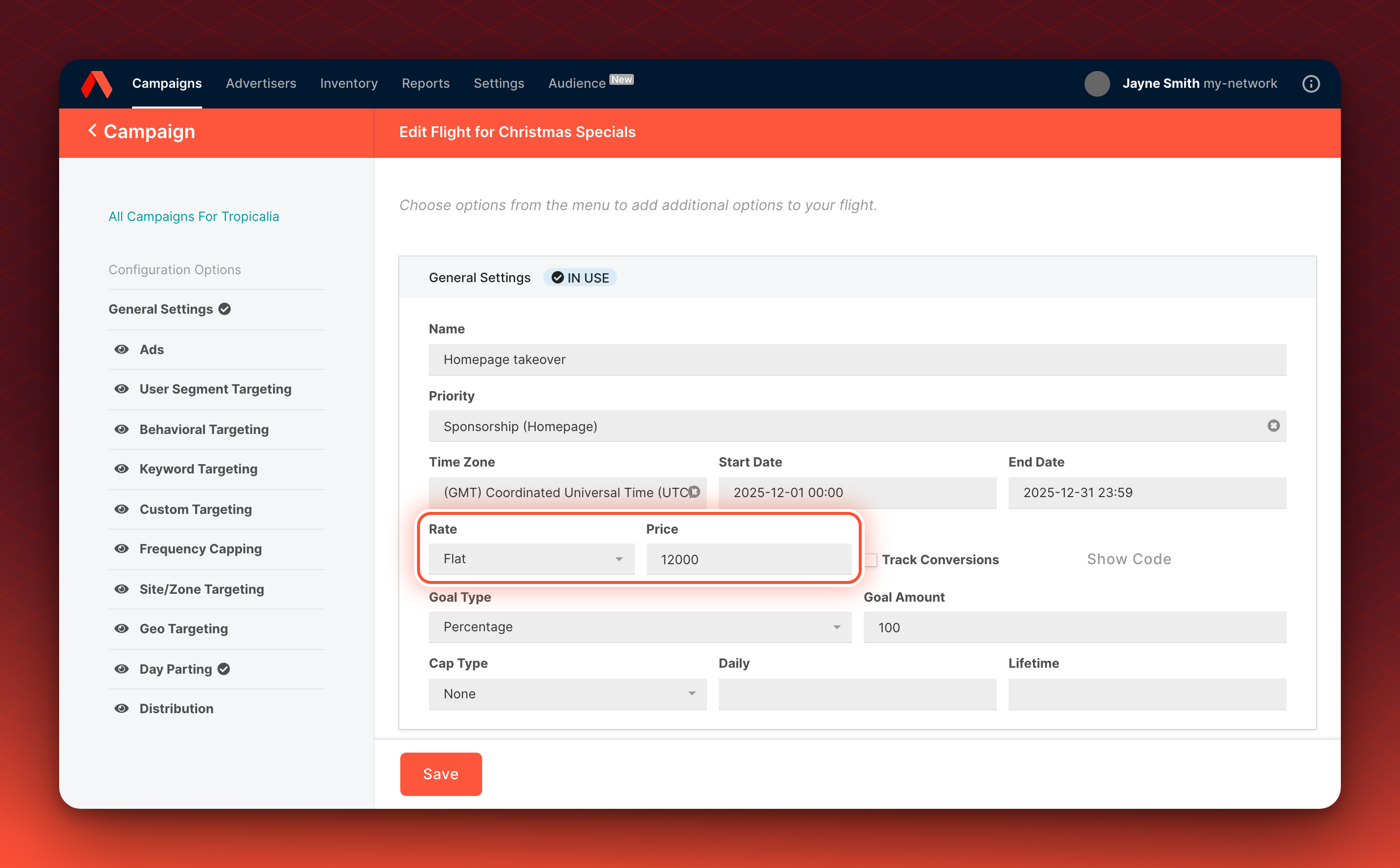
A flat-rate Flight serves like any other Flight and paces against its Goal Type and Goal Amount. The difference is in revenue:
| Flat | CPM, CPC and CPA | |
|---|---|---|
| Price is | The fee for the whole Flight | The price for 1,000 impressions, or for each click or conversion |
| Revenue an event earns | $0 | Set by Price and the event |
| Revenue in reports | The fee, once, at the Flight's start date, if your network accrues flat-rate revenue. See how accrual is set | Added up from events |
| eCPM in an auction | 0, unless you set an Override eCPM | Calculated from Price, and from performance for CPC and CPA |
An event on a flat-rate Flight earns $0 unless its tracking URL sets revenue. See Metadata on impressions and clicks. The Flights list in the Ad Server UI shows a Calculated eCPM of $0.00 for a flat-rate Flight whose events earn $0.
Lottery Priorities
In a lottery Priority, Kevel selects a flat-rate Flight like any other Flight. With a goal that does not depend on revenue, Rate and Price do not change how often it serves.
Auction Priorities
An auction ranks Flights by eCPM. Price does not feed the eCPM of a flat-rate Flight, so its eCPM is 0 and it ranks below every Flight with a positive eCPM. A Priority that applies a floor price above $0 removes the Flight from the auction, so it does not serve.
To make a flat-rate Flight compete, give it an Override eCPM. In the Ad Server UI, open eCPM Optimization, choose Use a fixed value for this flight's eCPM and enter an eCPM Override Value. In the API, the field is EffectiveCPMOverride. Kevel then ranks the Flight as it ranks a CPM Flight with that eCPM. The Ad Server UI requires an Override eCPM for a flat-rate Flight on an auction Priority. The API does not, so set EffectiveCPMOverride yourself when you create the Flight. For the setting, see Setting Up an Auction.
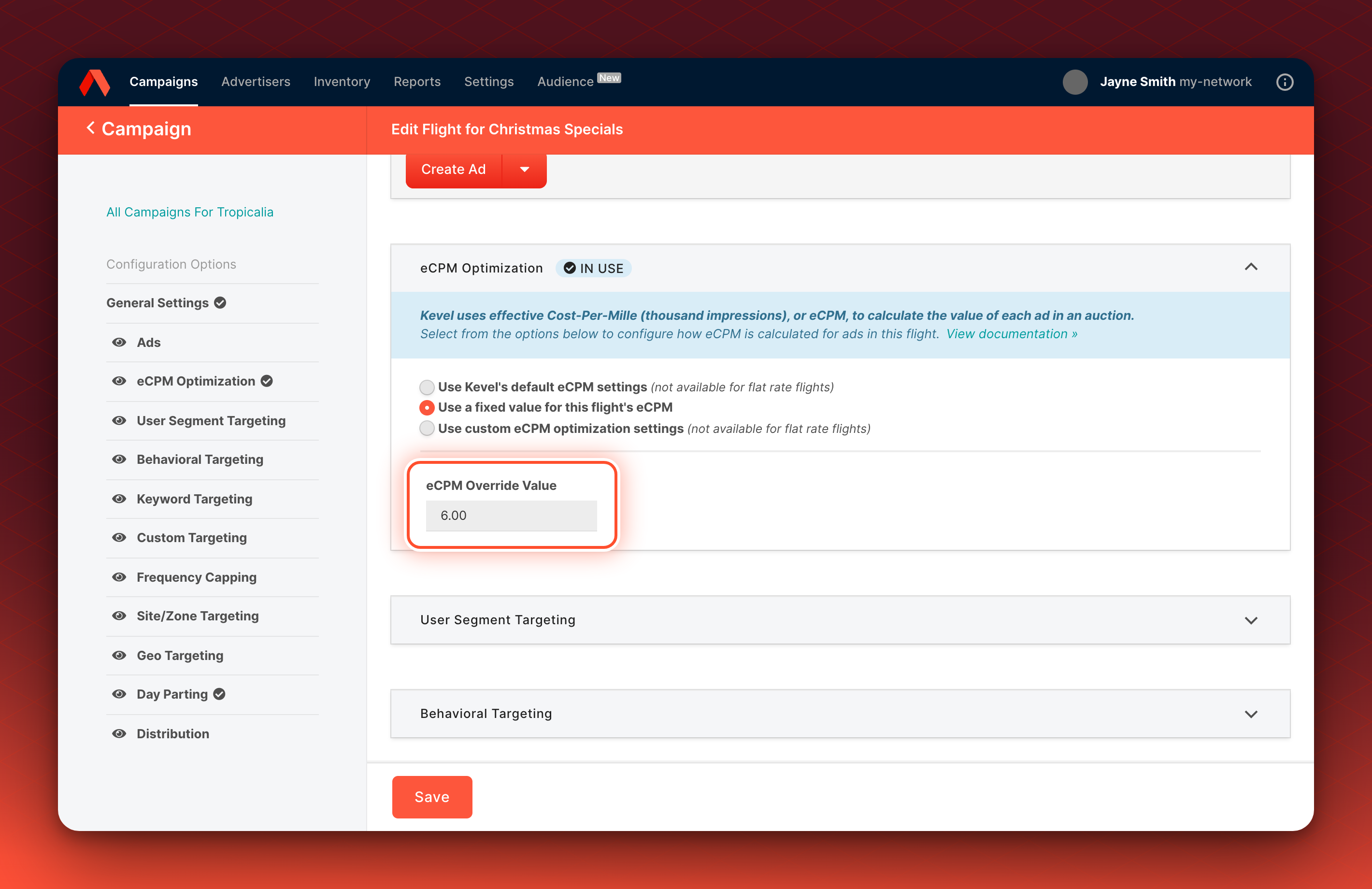
The Override eCPM sets the Flight's rank. It also decides whether the Flight clears a floor price, and in a second price Priority a flat-rate Flight that ranks second sets the winner's price like any other runner-up. See Second Price Auctions. It does not change what the Flight earns: the Flight still earns $0 per event.
Goals and caps
Goal Type and Goal Amount are required on a flat-rate Flight. What to choose depends on the Priority:
- Lottery Priority. Choose a goal that does not depend on revenue: impressions, clicks, conversions or percentage. For a takeover, choose Percentage and set Goal Amount to 100.
- Auction Priority. Goal Type must be Percentage, Revenue, Daily Revenue or Monthly Revenue. Choose Percentage. Kevel fixes Goal Amount at 100, and the Flight's ads compete in every auction. See Percentage goal behavior.
A Revenue, Daily Revenue or Monthly Revenue goal does not suit a flat-rate Flight. The Flight earns no revenue per event unless its tracking URL sets it, so the goal never completes and a revenue cap never triggers. Kevel still paces the Flight toward an impression target that it works out from the dollar amount, so the pacing does not follow the fee.
A budget cap on a flat-rate Flight never triggers, because its events earn $0 unless a tracking URL sets revenue. A flat-rate Price is not counted in a Campaign's or Advertiser's overall budget. See Ad Capping.
What you control
| Setting | Where it is set | Effect |
|---|---|---|
| Rate | Flight settings in the Ad Server UI, or RateType set to 1 in the API | Makes the Flight flat-rate |
| Price | Flight settings, or Price in the API | The fee for the whole Flight |
| eCPM Override Value | Flight settings, or EffectiveCPMOverride in the API | The Override eCPM: the eCPM the Flight ranks with in an auction |
| Goal Type and Goal Amount | Flight settings | How the Flight paces. A revenue goal does not suit a flat-rate Flight |
| Flat-rate revenue accrual | Your network setting, or FlatRateAccrualMethod on a report request | Whether reports include the fee. See Flat rate reporting |
Examples
| Setup | What happens |
|---|---|
| A $12,000 flat-rate Flight for a homepage takeover in a lottery Priority, Goal Type Percentage, Goal Amount 100, December 1 to 31 | It enters every lottery in that Priority at full weight, so it takes every impression the Priority serves unless another eligible Percentage Flight shares it. Reports show $12,000 on December 1 when your network accrues flat-rate revenue |
| The same Flight starting December 15 and ending January 14 | A December report shows $12,000 and a January report shows $0, because reports record the fee on the start date |
| The same Flight moved to a second price Priority with a $0.50 floor price and no Override eCPM | Its eCPM of 0 is below the floor price, so it does not serve. With an Override eCPM of $6.00 it ranks as a $6.00 CPM Flight, earns $0 per impression and still reports $12,000 on its start date when your network accrues flat-rate revenue |
| A new Flight in the Ad Server UI where you change neither Rate nor Price | The Flight starts as Flat at $0, unless Kevel has set another default for your network, and reports no revenue |
Defaults and scope
- Where you can set it. In the Ad Server UI and the Management API. Console offers only CPC and CPM. Real-time bidding Advertisers always use CPM.
- Default for new Flights. A new Flight in the Ad Server UI starts as Flat, unless Kevel has set another default Rate for your network.
- Wallets. Flat rate and wallets do not combine. The API rejects creating a flat-rate Flight on a Campaign that is linked to a wallet, and changing a Flight's Rate to Flat there. It also rejects linking a wallet to a Campaign that has flat-rate Flights, and that check counts paused and archived Flights. Change those Flights to another Rate, or delete them, first.
- Target ROAS and bid modifiers. A flat-rate Flight cannot have a Target ROAS. The Ad Server UI hides the Bid Modifiers panel for a flat-rate Flight, and the API does not reject bid modifiers on one. See Bid Modifiers.
- Changing the Rate. You can change a Flight to or from Flat, unless the wallet, Target ROAS or real-time bidding rule above applies, and Kevel shows no warning. A report you request after the change uses the Flight's current Rate, Price and start date, so a Flight you change to Flat shows its fee for past dates. A report that has already run keeps the values from when you requested it.
Troubleshooting
| What you see | Cause and fix |
|---|---|
The API returns Cannot create a flat-rate flight for a campaign that is linked to a wallet. or Cannot set a flat rate type on a flight whose campaign is linked to a wallet. | The Campaign is linked to a wallet. Use CPM, CPC or CPA for the Flight, or use a Campaign without a wallet |
The API returns Cannot link wallet to campaign because the campaign has flights with a flat rate type. | The Campaign has a Flight with Rate set to Flat that is not deleted. Change those Flights to another Rate or delete them, then link the wallet |
The API returns Target ROAS can not have a Flat RateType | Remove the Target ROAS from the Flight, or choose another Rate |
| A flat-rate Flight does not serve on an auction Priority | It may have no Override eCPM. Its eCPM is then 0, so it ranks last, and a floor price above $0 removes it. Set an Override eCPM |
| A flat-rate Flight never reaches its goal | The Goal Type is based on revenue. Choose a goal that does not depend on revenue |
| A flat-rate Flight shows $0 revenue in a report | Your network may not accrue flat-rate revenue, or the report range may not include the start date. See Flat rate reporting |
Related
Updated 23 days ago