
Wallets
How a wallet gives an Advertiser one shared budget across Campaigns, and how funding moves between wallets. For media owners and their developers.
A wallet is a shared budget for one Advertiser. Every Campaign linked to it spends from the same budget, so you set up and track one budget for a multi-Campaign activation. When the budget is used up, the linked Campaigns stop serving.
AvailabilityWallets are set up per network and are available in AWS environments. Contact your Kevel representative to turn wallets on.
Why use wallets
- One budget across Campaigns. Fund a multi-Campaign activation once, instead of capping each Campaign.
- Several budgets for one Advertiser. Use a wallet per purchase order, or separate wallets for brand and performance spend, or for managed service and self-serve.
- Spend you can reconcile. Balance history and adjustments show every change.
To cap a single Campaign or Advertiser, use a lifetime cap instead.
How wallets work
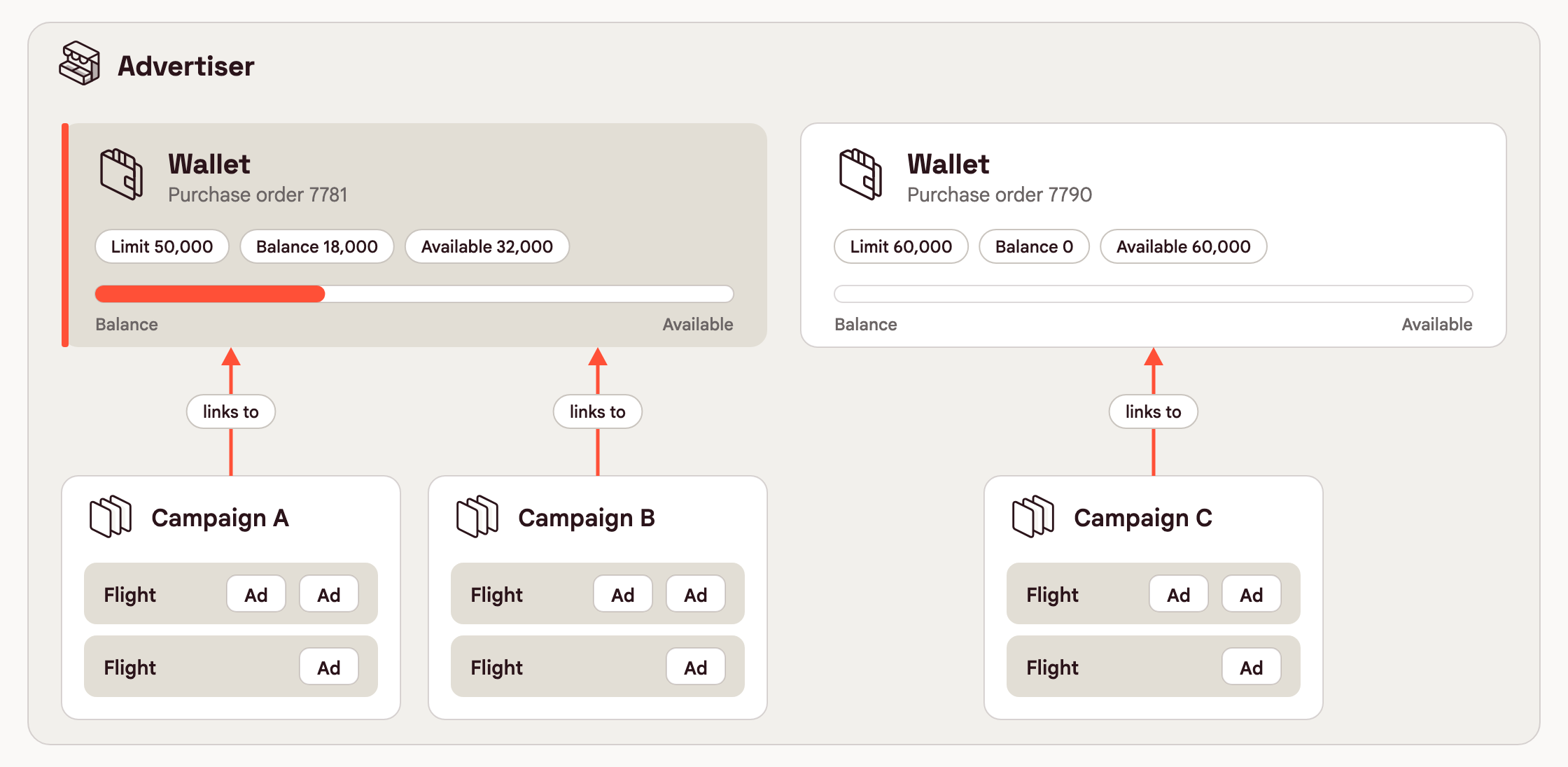
A wallet belongs to your network. You assign it to an Advertiser, then link it to that Advertiser's Campaigns.
| Object | Relationship to the wallet |
|---|---|
| Wallet | Belongs to your network and is assigned to one Advertiser. |
| Advertiser | Can have several wallets. Assigning a wallet makes it available to the Advertiser's Campaigns but does not link it. |
| Campaign | Links to one wallet. Several Campaigns can share a wallet. Every Flight and Ad in the Campaign spends against it. |
Where to create and manage wallets
Wallets are available only in AWS networks, in Kevel Console and the Management API. They are not yet in the Kevel Ad Server UI or GCP networks.
- Kevel Console. Create, fund, edit and switch wallets on or off. See Wallets in Console.
- Management API. Everything in Console, plus moving a wallet to another Advertiser and unlinking a Campaign. See Manage wallets with the API.
- Kevel Ad Server UI. Not available yet.
Spend limits
Each wallet has a Limit and a Balance. Delivery adds the spend of every linked Campaign to the Balance. When the Balance reaches the Limit, the linked Campaigns stop.
| Value | What it means | Console label |
|---|---|---|
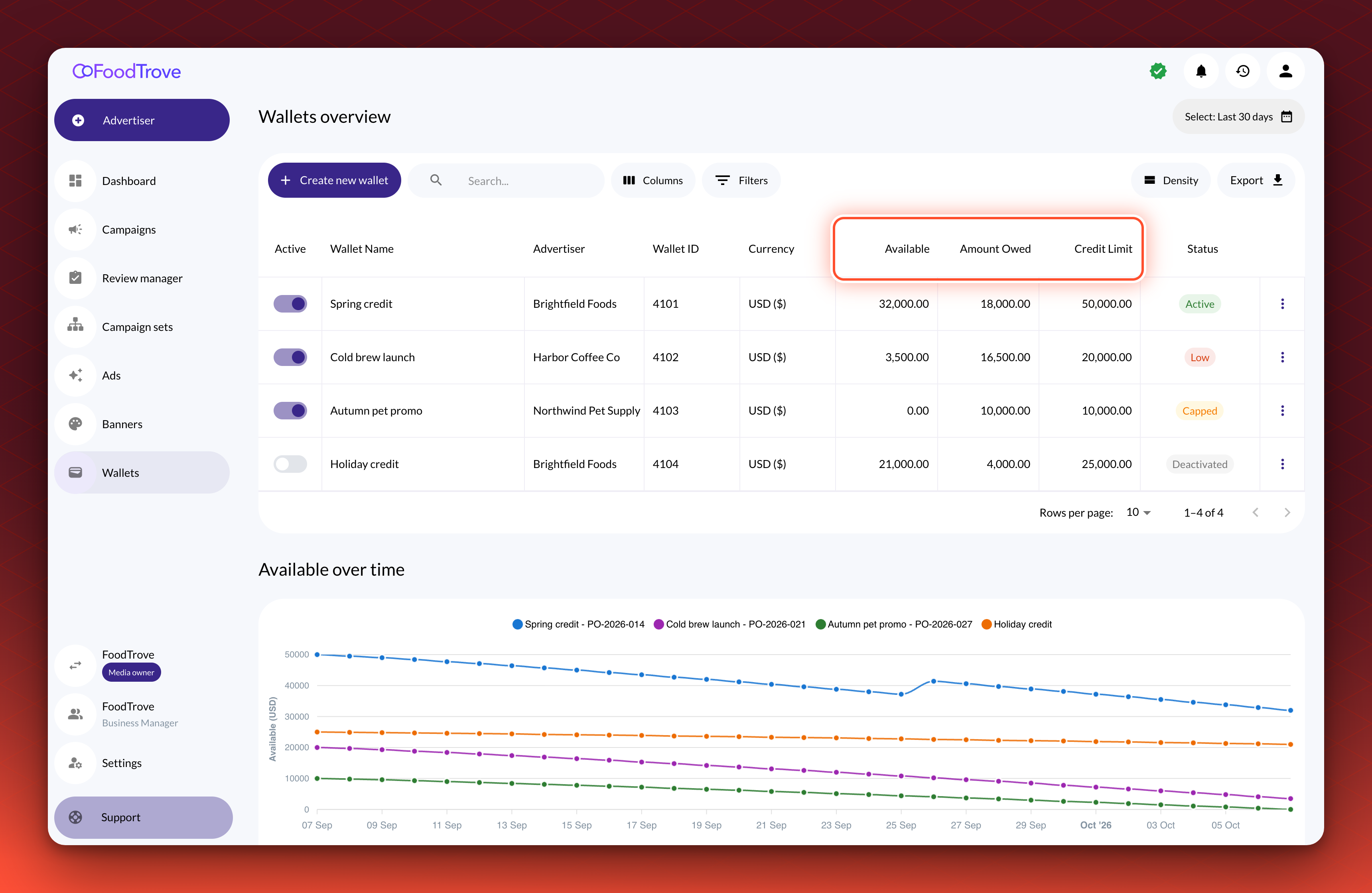
| Limit | The Balance at which linked Campaigns stop. Positive, zero or negative. | Credit Limit |
| Balance | Spend minus payments and credits. Changes only through delivery and adjustments. | Amount Owed, when above zero |
| Available | What the wallet can still spend: Limit - Balance. | Available |
With a Limit of 50,000 and a Balance of 18,000, Available is 32,000.
A wallet counts spend from ads served while a Campaign is linked. Clicks and conversions count against the wallet that was linked when the ad was served.
Check what is left and find spend
| To see | In Kevel Console | With the API |
|---|---|---|
| What is left now | The Available column on the Wallets page | The Limit from Get Wallet minus the Balance from Get Wallet Balances |
| What the Advertiser owes | The Amount Owed column | The Balance, when it is above 0 |
| How it changed over time | The wallet's Balance history for media owners, or the Available over time chart for advertisers | List Wallet Balance History |
With the API you can also list the payments, credits and charges you posted with List Wallet Adjustments. To work out delivery spend for a period, see Reconcile spend.
Credit or funded
A wallet has no type. The Limit sets how it behaves.
| Credit line | Funded | |
|---|---|---|
| Limit | The credit you extend, such as 1,000 | 0 |
| Campaigns spend | Up to the Limit, then stop | Only once the wallet is funded |
| When the Advertiser pays | Fund the wallet. The Balance drops, and Campaigns can spend again | Fund the wallet with the amount paid |
In Kevel Console, Fund takes the amount paid as a positive number, such as 1,000. The API records it as an adjustment of -1,000. A funded wallet with a Limit of 0 is capped until you fund it, so fund it before you link a live Campaign.
Adjustments
An adjustment adds a signed amount to the Balance. Use it for payments, credits, refunds and offline charges.
| To record | Amount | Effect |
|---|---|---|
| A payment or a credit | Negative | Lowers the Balance and gives the wallet more room. |
| A charge that did not come from delivery | Positive | Raises the Balance and uses room up. |
In Kevel Console, Fund posts a negative adjustment and Refund a positive one.
When a wallet can spend
A Campaign spends from its wallet while the wallet has room and is active. Kevel Console shows one status for each wallet. The API has no status field, so work it out from IsActive, the Limit, the Balance and NotificationThreshold.
A wallet switched off (IsActive false) shows Deactivated, whatever its Balance. A wallet that is on shows one of three statuses.
| Status | Means | Linked Campaigns |
|---|---|---|
| Active | Available is above 0, and above NotificationThreshold if one is set. | Spend |
| Low | Available is above 0 but at or below NotificationThreshold. | Spend |
| Capped | Available is 0 or less. | Stop |
| Deactivated | The wallet is switched off. | Stop |
A Campaign with no linked wallet has no wallet cap.
- Other caps still apply. A Campaign stops at whichever cap it reaches first. A wallet has no daily limit.
- Flight goals and pacing settings do not change. As a wallet nears its Limit, delivery checks its Campaigns more often so they stop close to it.
- Changes take a short delay to reach serving. The Balance, and so the Capped status, trails delivery slightly.
Move funding to a new wallet
A swap moves a Campaign from one wallet to another in one call, and the Campaign keeps serving. Use it when a purchase order ends or a new quarter starts.
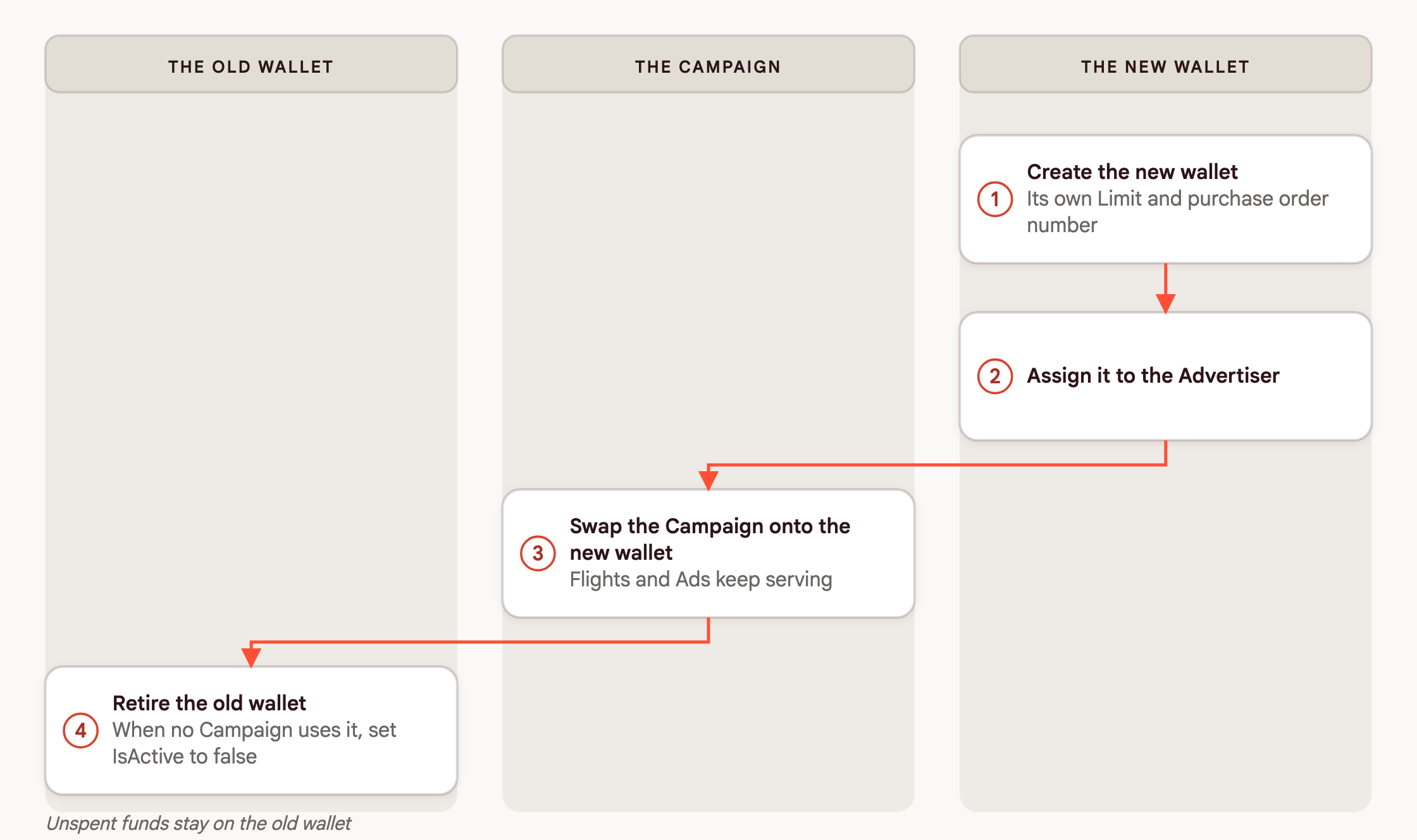
Before you swap, check that the new wallet has room and is active. The swap does not check, and a Campaign swapped onto an inactive wallet, or one with no room, causes ads in the Campaign to stop serving.
| After the swap | What happens |
|---|---|
| Campaign, Flights and Ads | Unchanged. IDs, reporting history and frequency caps stay the same. |
| Ads served before the swap | Count against the old wallet, with their later clicks and conversions. |
| Ads served after the swap | Count against the new wallet once the swap reaches serving. |
| Lifetime caps | Keep counting across both wallets. Raise any cap that stood in for the purchase order budget. |
| Unspent funds | Stay on the old wallet. |
To carry unspent funds over, wait until the old wallet's Balance stops changing. Then post a positive Amount on the old wallet and a negative one of the same size on the new wallet, each with a Memo naming the other.
Where to change each setting
| Setting | Where | Effect |
|---|---|---|
| Limit | Wallet endpoints, or Edit in Kevel Console | Raise it to let linked Campaigns spend more. |
IsActive | Wallet endpoints, or the switch in Kevel Console | Stops or restarts every linked Campaign. |
| Advertiser assignment | Advertiser wallet endpoints | Makes the wallet available to the Advertiser's Campaigns. |
| Campaign link | Campaign wallet endpoints, or the Wallets array on a Campaign | Makes a Campaign spend from the wallet. Swap replaces it, and unlinking removes the cap. |
| Adjustments | Wallet adjustment endpoint, or Fund and Refund in Kevel Console | Changes the Balance. |
NotificationThreshold | Wallet endpoints, or Edit in Kevel Console | Kevel Console shows an in-app notification for an active wallet when Available falls to or below it. |
Manage wallets with the API
Set up a wallet in three calls, sending your API key in the X-Kevel-ApiKey header:
- Create Wallet with a name, your network's wallet currency and a Limit.
- Assign Wallet to Advertiser.
- Link Wallet to Campaign, once for each Campaign.
Keep the IDs each call returns. Removing an assignment or unlinking a Campaign takes the link's ID, not the wallet ID.
| ID | Comes from | Used to |
|---|---|---|
Wallet Id | Create Wallet | Adjust, read balances and history, assign and link |
Assignment Id | Assign Wallet to Advertiser | Remove one assignment. Removing several takes wallet IDs |
Campaign link Id | Link Wallet to Campaign | Unlink the wallet |
No endpoint lists a wallet's Campaigns. List the Advertiser's Campaigns and call List Campaign Wallets for each. Do this before you swap or deactivate a wallet, because advertisers who book in Kevel Console can swap their own wallet.
To move a Campaign to a new wallet, see Swap Campaign Wallet. To reconcile a period's spend, see List Wallet Balance History. All endpoints are in the Wallets API, Advertiser Wallets and Campaign Wallets reference.
Common use cases
One budget for a multi-Campaign activation. Create a wallet with the activation's budget as the Limit, assign it to the Advertiser and link every Campaign in the activation. They stop together when the budget is used up.
New purchase order. Create a wallet for purchase order B with its own Limit and ExternalId, assign it to the Advertiser and swap the Campaign from A to B. Raise any lifetime cap that held A's budget, and when no Campaign uses A anymore, set its IsActive to false.
Good to know
- Currency. Every wallet uses your network's wallet currency. It is fixed when you create the wallet.
- Flat-rate Flights. A Campaign linked to a wallet cannot have flat-rate Flights. The API blocks them, except for Flights sent in the same
POST /v1/campaignrequest and for Swap Campaign Wallet, so check those yourself. - Deletion. Wallets are not deleted. Set
IsActiveto false to take one out of use.
FAQ
A Campaign has already spent part of its budget. What Limit do I set?
Set the Limit to what is left. Spend from before the link does not count.
Do clicks and conversions after I unlink or swap still count?
Yes, against the wallet that was linked when the ad was served.
Can a Flight spend from a different wallet from its Campaign?
No. The wallet links to the Campaign, and a Flight cannot move to another Campaign. To change where a Flight's money comes from, swap its Campaign's wallet.
Why did a linked Campaign stop serving?
Check the wallet's status, then the Flight, Campaign and Advertiser caps. See When a wallet can spend.
Related
Updated about 2 hours ago