
Bulk Create from CSV
Create Advertisers, Campaigns, Flights and Ads from one CSV file, check every row in a review first, and download the rows that were not created.
Bulk Create from CSV lets you create Advertisers, Campaigns, Flights and Ads in the Ad Server UI by uploading one CSV (comma-separated values) file. Use it when you are setting up many entities at once, such as an Advertiser with dozens of Campaigns, or one Campaign with an Ad for each language.
A file can hold one entity type or all four. A row can point at a parent row elsewhere in the file, so a full Advertiser, Campaign, Flight and Ad hierarchy goes up in one upload. Every row is checked in a review before anything is created.
AvailabilityBulk Create from CSV is turned on per network. If you do not see Bulk create from CSV in the menu next to the button that creates a new Campaign, contact your Kevel representative. You also need edit access to the network.
How it works
- One row creates one entity. The
EntityTypecolumn says which:advertiser,campaign,flightorad. Fill only the columns that start with that entity's name (Advertiser_,Campaign_,Flight_,Ad_) and leave the rest of the row blank. - Parents are created first. Kevel creates Advertisers, then Campaigns, then Flights, then Ads. Rows can appear in any order in the file.
- An Ad row creates a Creative and places it in the Flight. To use a Creative that already exists, fill
Ad_CreativeId.
Link rows with reference labels
Advertiser, Campaign and Flight rows each have a RefId column, such as Advertiser_RefId. A RefId is a label you make up, such as adv-1 or spring-campaign. A child row puts its parent's label in its parent column: Campaign_AdvertiserId, Flight_CampaignId or Ad_FlightId. When the parent is created, Kevel swaps in its real ID.
A parent column takes either kind of value:
| If the parent... | Put this in the parent column | Example |
|---|---|---|
| Is created in this file | The parent row's RefId | adv-1 |
| Already exists in your network | The parent's numeric Kevel ID | 1000003000 |
Kevel assigns every ID. A RefId is only a label for linking rows in this file, even when it is written as digits. The review checks any existing ID against your network, and asks you to change a digit label that matches an existing ID the file also uses.
Before you start
Where it applies. The All Campaigns page of the Ad Server UI, on networks that have the feature turned on. To add only Flights to a Campaign, or only Ads to a Flight, see Create in bulk with CSV.
What you need. Edit access to the network. Also the IDs of anything the file refers to that already exists. That means a parent Advertiser, Campaign or Flight that is not in the file, a Priority for each Flight, and an Ad Type for each Ad.
Some columns need a feature turned on for your network. The field reference marks each one. A cell for a feature your network does not have is rejected or ignored, so clear it. To have a feature turned on, contact your Kevel representative.
What it does not do.
- It creates new entities only. Every row becomes a new Advertiser, Campaign, Flight or Ad. To change an existing entity, edit it in the UI or use the Management API.
- It does not set custom fields on Advertisers or Campaigns. Flights take theirs in
Flight_CustomFieldsJson. - It accepts up to 100 rows of each entity type per file. To create more, split the file and upload the parts one after another.
- It does not block duplicate names. Kevel allows entities with the same name, so the review warns you instead. See Upload and review.
Prepare your file
-
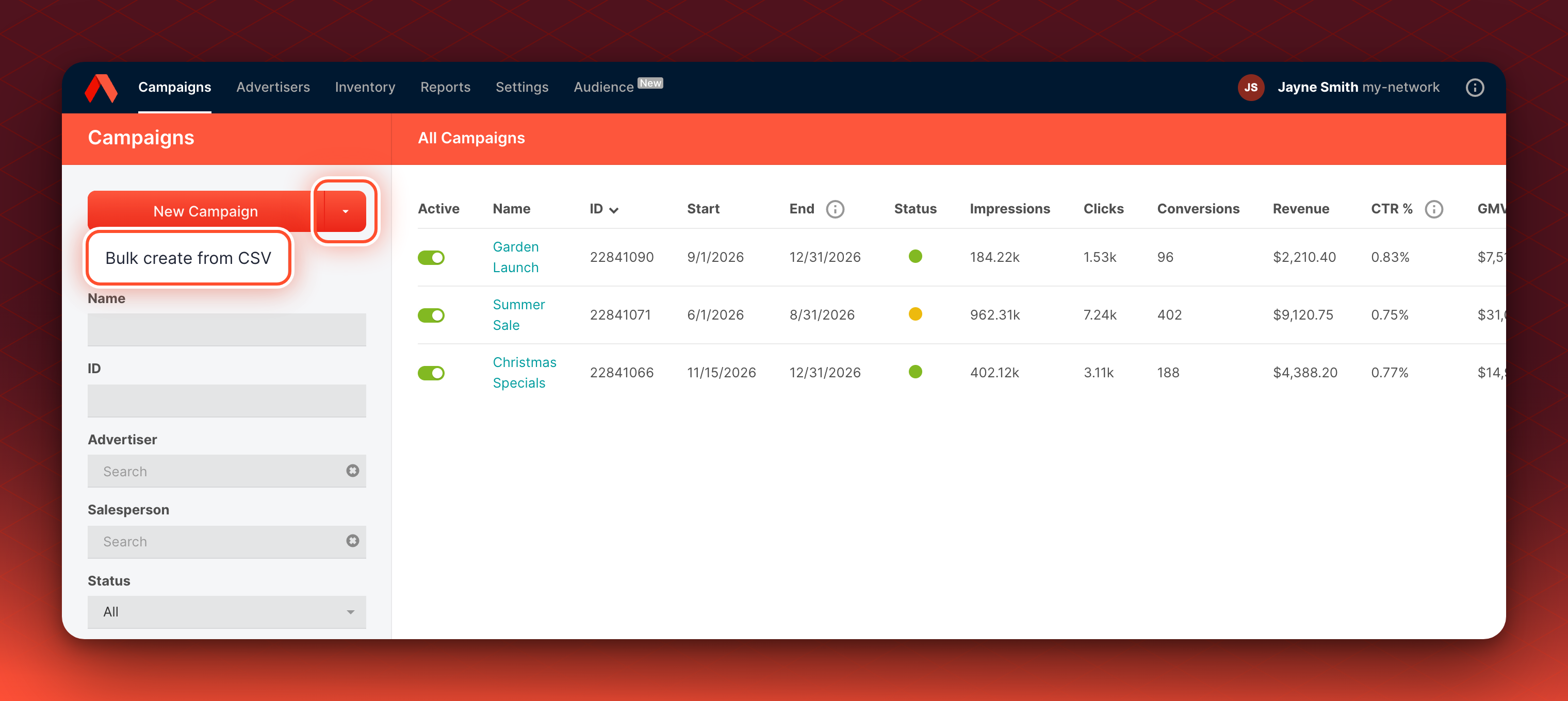
Open the upload dialog. On the All Campaigns page, select the arrow next to the button that creates a new Campaign, then select Bulk create from CSV.
-
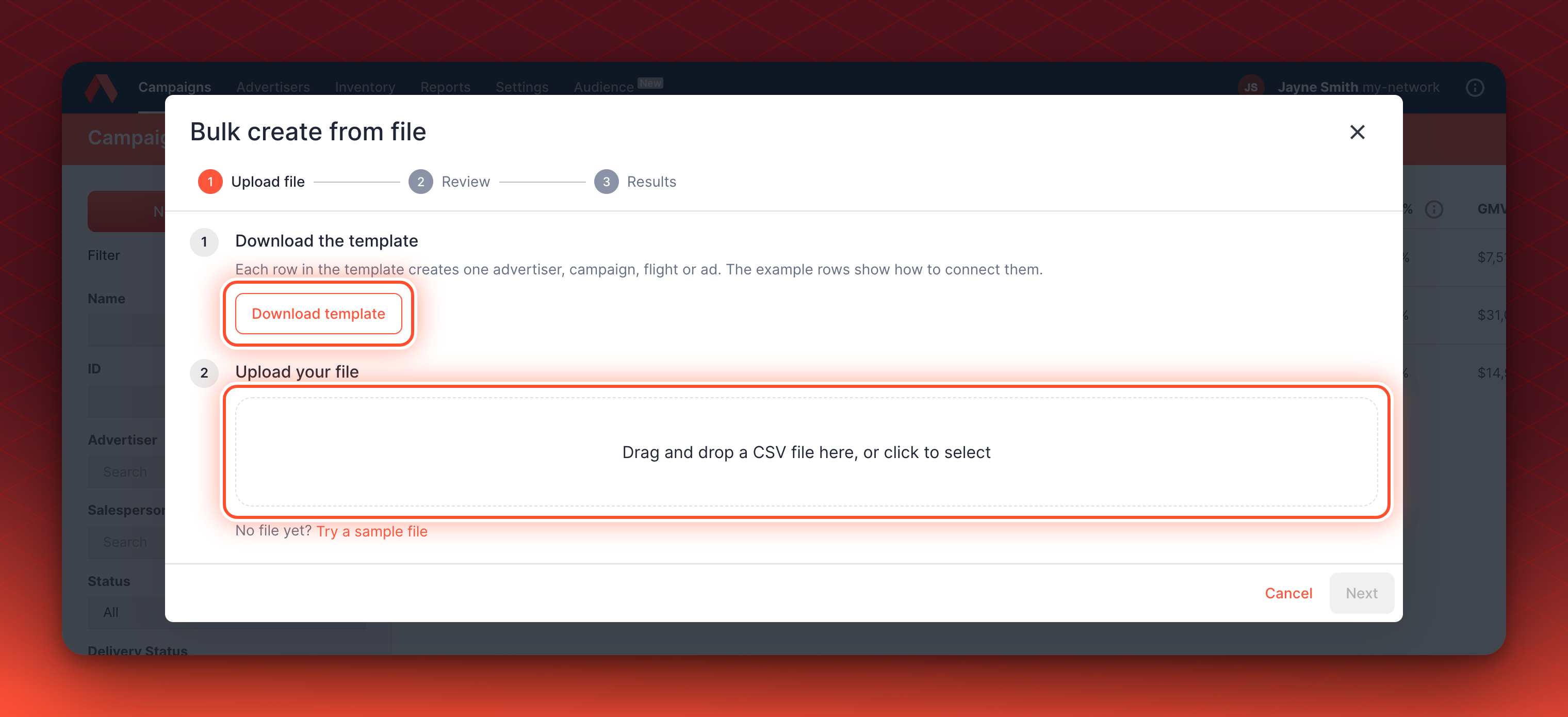
Download the template. In the Upload file step, select Download template. The file has the columns for all four entity types and one linked example row for each. The example rows fill almost every column with a placeholder to show the format, and leave the ID columns blank. Uploaded as they are, they fail or save placeholder values. Replace the placeholders you need, clear the cells for settings you do not want or your network does not have, and fill the ID columns for anything that already exists.
-
Fill in your rows. These rules apply to every column:
- Keep the header row as downloaded. A renamed or extra column is reported as an unknown column.
- Leave a cell blank to leave that setting unset. On the six Advertiser and Campaign frequency-cap columns, 0 clears the value. On every other column, 0 is a real value.
- Write numbers with digits only, with no sign, thousands separator or exponent. Whole-number columns reject decimals such as 10.5. A value like 10.0 is read as 10.
- Write dates as
2026-03-02, or2026-03-02T09:00:00to include a time. A date such as 02/03/2026 is rejected because the day and month can be read two ways. - Put any value that contains a comma in double quotes, for example
"shoes,running". - JSON columns (targeting, attribution, metadata) need valid JSON in a quoted cell, with the quotes inside it doubled. Spreadsheet tools do this when they save as CSV.
- Save the file as CSV in UTF-8. In Excel, choose CSV UTF-8. Files in other encodings, and files that are not CSV, are blocked.
The field reference lists every column for each entity type.
Uploading an existing fileA file that already follows this format, including one from Download rows, uploads as it is. The alternate parent column names
Campaign_AdvertiserRef,Flight_CampaignRef,Ad_FlightRefandAd_AdvertiserRefare accepted next to the ID columns. If a row fills both a column and its Ref column, they must hold the same value.
Upload and review
-
Upload your file. Drag the file onto the drop area, or select the area to choose it. The dialog reports how many rows it found, by entity type. To use a different file, select the remove button next to the file name. To see how the review works first, select Try a sample file. Its Flight and Ad rows stay not ready until you add a Priority ID and an Ad Type ID from your network.
-
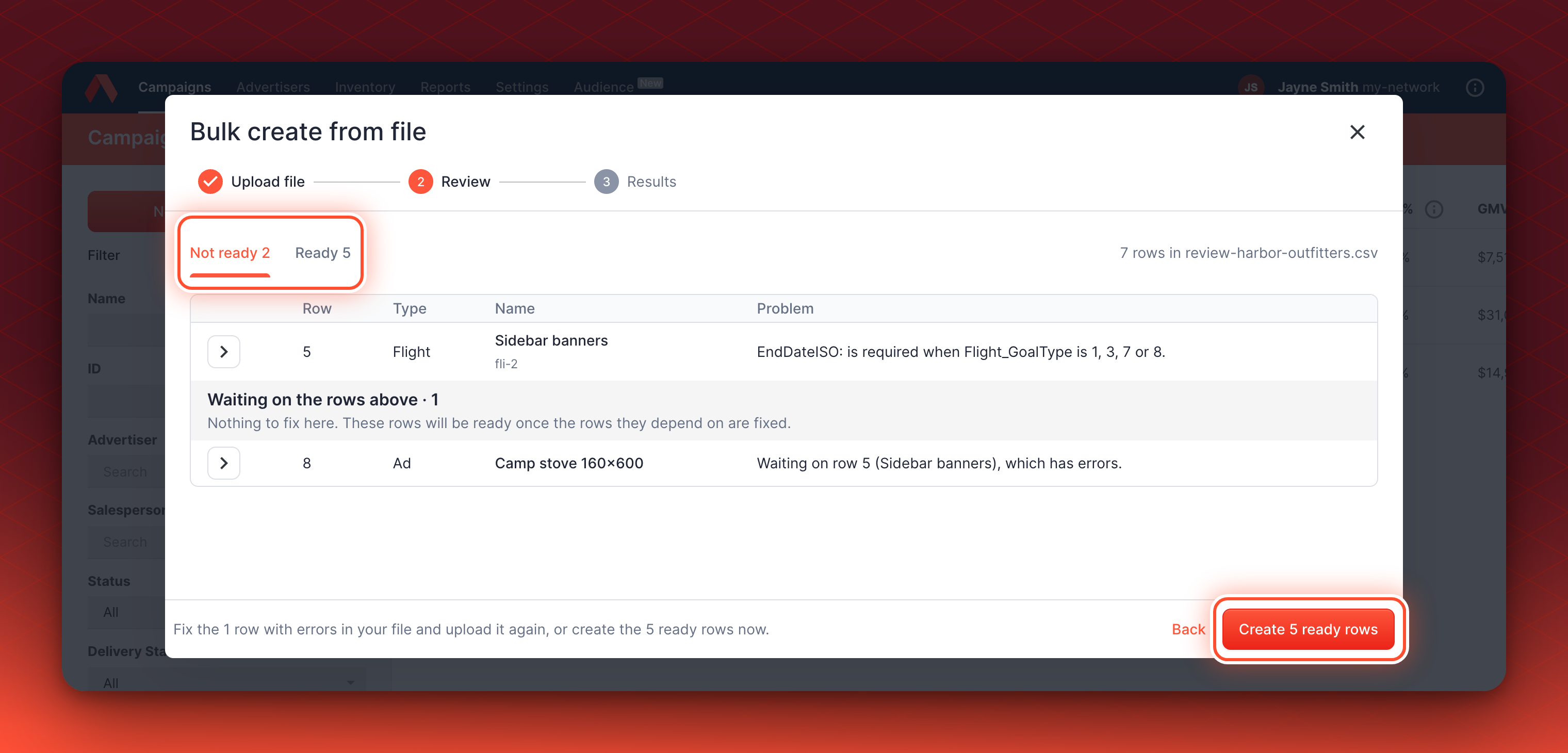
Select Next. The review checks every row and sorts them into Not ready and Ready tabs, each with a count. A Not ready row shows its problem, and a Ready row shows the parent it belongs to. Select a row to see its values.
-
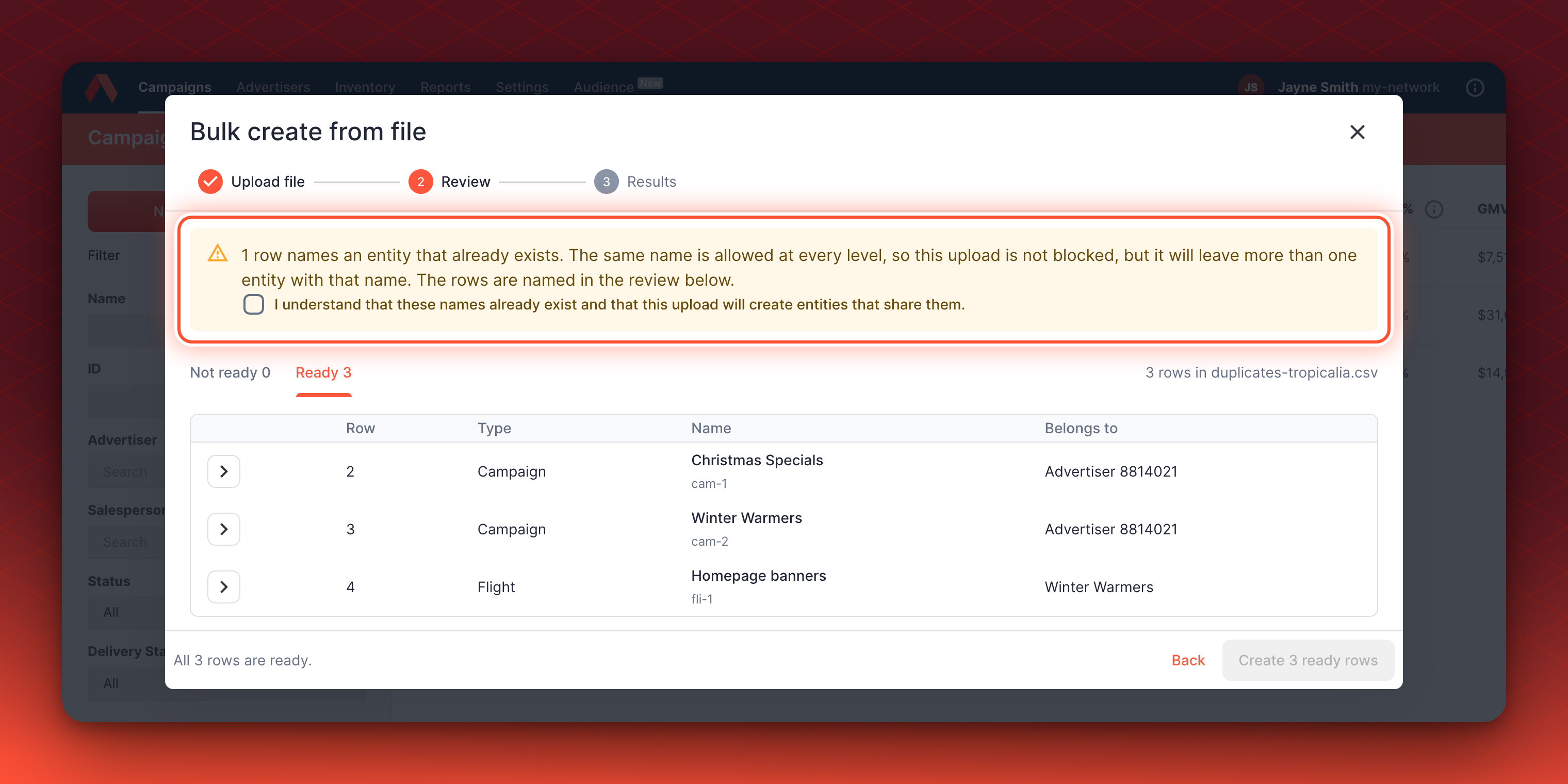
Acknowledge duplicate names, if the review asks. If a Campaign, Flight or Ad has the same name as one that already exists under the same parent, the review shows a warning. Select the checkbox to confirm you want entities that share a name. Advertiser names are not checked.
What the review finds
| What the review finds | What happens |
|---|---|
| A cell has an invalid value, such as the wrong type, an unknown option, malformed JSON or a parent ID that is not in your network | The row is Not ready. The Problem column names the column and says what to change. The rest of the file can still be created. |
| A row's parent row has an error | The row is listed under Waiting on the rows above. It becomes ready when you fix the parent. |
| The file is not a UTF-8 CSV, or has an unknown column | The file is blocked. The message says what to fix. |
Create the entities and read the results
-
Select Create ready rows. The button shows the count, for example Create 5 ready rows. Only ready rows are created, and rows with errors or waiting on them are left out. To fix the file first, select Back instead. Keep the dialog open until the progress bar finishes.
-
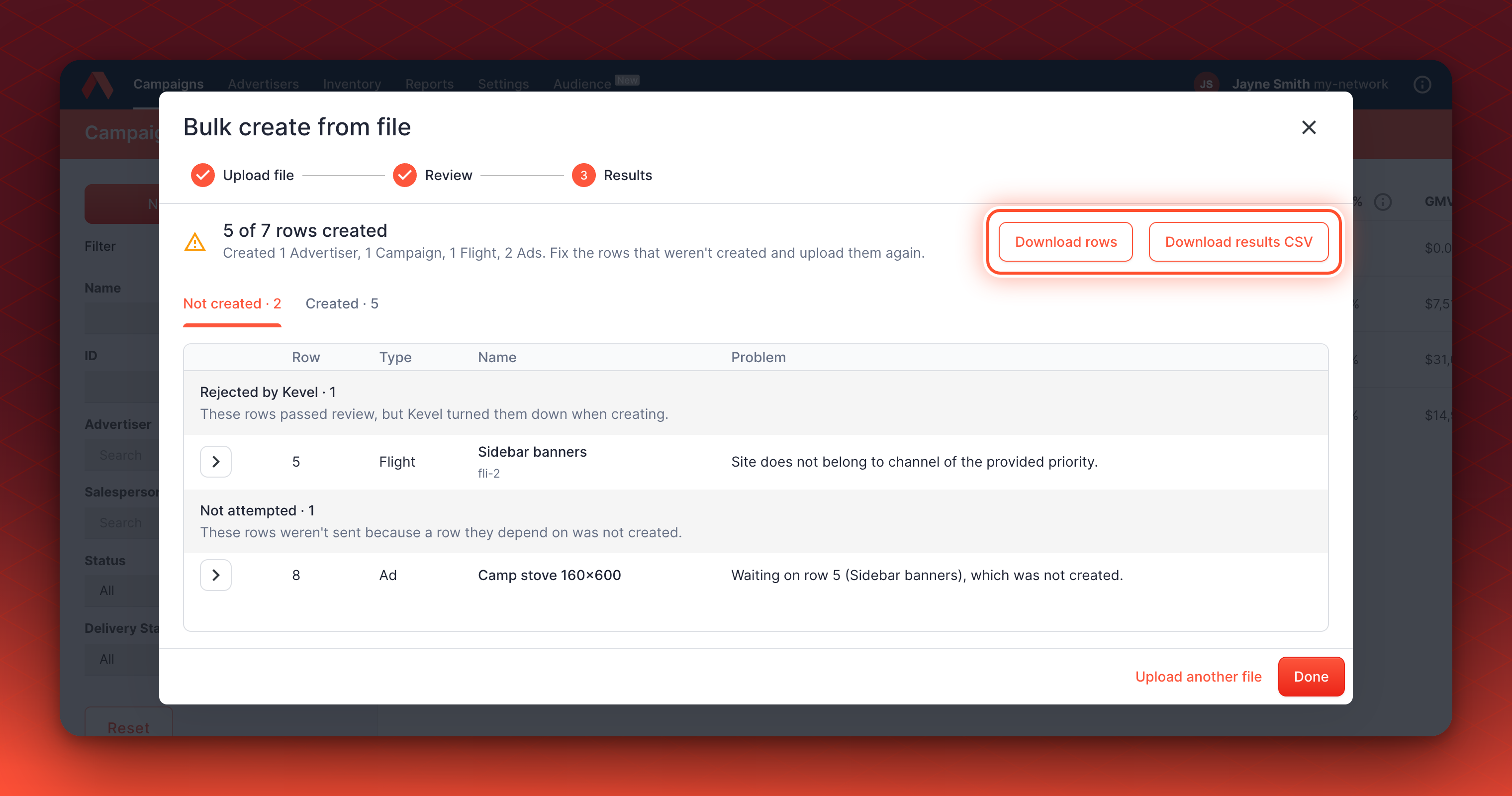
Read the results. The heading says how many rows were created. The Created tab lists each new entity with its Kevel ID, linked to its page. Ads link to their Flight. The Not created tab groups the rest, as the table below explains. A row that Kevel rejects is not created. If part of an Ad row was created first, Kevel removes it. Parents that were created stay.
-
Download the files you need. Download results CSV lists every row with its outcome, the ID Kevel assigned and any error. Dropped values lists a name or active setting that Kevel changed when it created the row.
-
Upload the rows that were not created. Select Download rows, fix the fields named in the
_BulkImportErrorscolumn, then select Upload another file and upload it. The file holds only the rows that were not created, with created parents filled in by ID, so nothing is created twice.
What the Not created groups mean
| Group | What it means | What to do |
|---|---|---|
| Rejected by Kevel | The row passed the review and Kevel turned it down. The row says why. | Fix the field it names. |
| Not attempted | A row it depends on was not created. | Fix the parent first. |
| Not ready at review | The row had errors before creation started. | Fix the file. |
Troubleshooting
"Unknown column". A header was renamed, or the file was not made from the template. Copy your rows into a freshly downloaded template.
"is not an existing Campaign in this network". The ID does not exist in the network you are working in, or belongs to another network. Check the ID in the UI, or use the parent row's RefId if the parent is in the file. Advertiser and Flight IDs report the same way.
"You must have advertiser-level frequency capping enabled for your network". The frequency-cap columns on an Advertiser or Campaign need frequency capping turned on for your network, and the template fills them in. Clear the cells, or contact your Kevel representative to turn it on.
An Ad was created without its goal. Ad_GoalType and Ad_Goal need Ad Goals turned on, and the template fills them in. Without it Kevel creates the Ad and ignores both columns. Contact your Kevel representative to turn it on.
"FloorECPM must be less than CeilingECPM", "Target ROAS can not have a Flat RateType" or "FreqCapDuration cannot be longer than 168 hours". The template's placeholder values break these rules. Clear the cells you do not need, or enter real values.
"Ad addition is currently disabled. Please contact Kevel support." Kevel has paused adding Ads on your network. Contact Kevel Support, then upload the rows that were not created.
"This Campaign cannot be modified because it is pending approval, approved or active." On a network that uses Campaign Approvals, Ads cannot be added to a Campaign that is active or in approval. Upload them with a Campaign created in the same file, or add them in the UI.
An end date is required. Flight_GoalType is 1, 3, 7 or 8 and Flight_EndDateISO is blank. Add an end date, or use goal type 2, 9 or 10.
A new Creative needs a title or content. A new Creative needs Ad_CreativeTitle and one of Ad_ImageLink, Ad_ScriptBody or Ad_TemplateValues. Fill them, or fill Ad_CreativeId to use an existing Creative.
"Site does not belong to channel of the provided priority". A Site in Flight_SiteZoneTargeting is not mapped to the Channel that owns the Flight's Priority. Each value can be valid alone and still be rejected as a pair. Map the Site to that Channel under Inventory, or choose a Priority from a Channel the Site already belongs to, then upload the rows again.
A row says it was throttled. Kevel was limiting new entities when the row was sent. Nothing is wrong with the row. Download the rows that were not created and upload them again later.
If an error persists after these steps, contact Kevel Support with your file and the results file.
Field reference
Each table lists every column for one entity type: whether it is required, what it accepts, an example, and which other columns it interacts with. The rules in Prepare your file apply to every table. Decimal columns list their bounds where the API enforces one. A column that says it needs a feature turned on works only on networks that have that feature.
| Entity | API reference |
|---|---|
| Advertiser | Create Advertisers |
| Campaign | Create Campaigns and Create Campaign V2 |
| Flight | Create Flight |
| Ad | Create Creative and Create Ads |
Advertiser
| Column | Required | Type or accepted values | Example | Depends on |
|---|---|---|---|---|
| EntityType | Yes | text. Must be advertiser on Advertiser rows. | advertiser | |
| Advertiser_RefId | Yes | Your label for this row, used to link rows in this file. Each row of this type needs a different label. Kevel assigns the numeric ID whatever you type. | adv-1 | Referenced by Campaign_AdvertiserId and Ad_AdvertiserId on child rows. |
| Advertiser_Title | Yes | Text in one CSV cell. Quote values containing commas. | Example Advertiser | |
| Advertiser_IsActive | No | One of true, false, 1, or 0. Set to true so the Advertiser can serve. | true | |
| Advertiser_PlacementLimit | No | Whole number, no decimals. Maximum number of placements this Advertiser's ads can fill in a single ad request. | 12345 | |
| Advertiser_FreqCap | Conditional | Whole number of allowed events in the frequency-cap window. No decimals. Enter 0 to clear this value. | 3 | Required when Advertiser_FreqCapType is 1, 2 or 3, and must not be 0 then. Use with Advertiser_FreqCapType and Advertiser_FreqCapDuration. Needs frequency capping for Advertisers and Campaigns turned on for your network. Without it Kevel rejects a non-zero value, so leave it blank. |
| Advertiser_FreqCapDuration | Conditional | Whole number of time units in the frequency-cap window, in the unit selected by Advertiser_FreqCapType. No decimals. Enter 0 to clear this value. | 7 | Required when Advertiser_FreqCapType is 1, 2 or 3, and must not be 0 then. Use with Advertiser_FreqCapType and Advertiser_FreqCap. Needs frequency capping for Advertisers and Campaigns turned on for your network. Without it Kevel rejects a non-zero value, so leave it blank. |
| Advertiser_FreqCapType | No | 1 hour, 2 day, or 3 minute. Enter 0 to clear this value. | 2 | When 1, 2 or 3, Advertiser_FreqCap and Advertiser_FreqCapDuration are required. The type selects the duration unit. Needs frequency capping for Advertisers and Campaigns turned on for your network. Without it Kevel rejects a non-zero value, so leave it blank. |
| Advertiser_CapType | No | 4 (revenue). Advertisers can only budget-cap on revenue. Leave blank for no budget cap; do not enter 0. | 4 | Selects the unit for Advertiser_DailyCapAmount and Advertiser_LifetimeCapAmount. Required when either cap amount is filled. |
| Advertiser_DailyCapAmount | No | Whole number, no decimals. Maximum revenue per day, in whole currency units. | 500 | Requires Advertiser_CapType. |
| Advertiser_LifetimeCapAmount | No | Whole number, no decimals. Maximum lifetime revenue, in whole currency units. | 10000 | Requires Advertiser_CapType. |
| Advertiser_ExternalId | No | Text, 1 to 200 characters. An ID from your own system, stored for reference. Letters, digits and symbols are all accepted. | ACME-001 | |
| Advertiser_PartnerId | No | Whole number, no decimals. ID of the RTB partner. RTB-enabled advertisers only; your account manager supplies this value. | 12 | Use with Advertiser_RtbCustomFields. Leave blank unless Kevel gave you an RTB partner ID. An ID that is not mapped to your network is rejected. On an RTB Advertiser, Kevel sets fixed values for Ad_Alt, Ad_Url, Ad_ImageName, Ad_Body and Ad_IsHTMLJS on its Ads, and Flight_RateType 2 on its Flights. |
| Advertiser_RtbCustomFields | No | JSON in one cell. JSON object supplied by your RTB partner. RTB-enabled advertisers only. | {"seat":"abc123"} | Use with Advertiser_PartnerId. Without Advertiser_PartnerId Kevel ignores the value. Include every field your RTB partner requires. |
| Advertiser_CatalogAccess | No | JSON in one cell. A JSON array of objects, each with a CatalogId and an optional ProductQuery. Defines which catalog items this Advertiser can use. | [{"CatalogId":1234}] | The CatalogId must be a catalog in your network. |
| Advertiser_Segments | No | JSON in one cell. A JSON array of objects, each with a SegmentId. Controls which segments this Advertiser can target in Kevel Console; has no effect on campaigns managed in the Ad Server. | [{"SegmentId":5678}] | Each SegmentId must exist in your network. |
Campaign
| Column | Required | Type or accepted values | Example | Depends on |
|---|---|---|---|---|
| EntityType | Yes | text. Must be campaign on Campaign rows. | campaign | |
| Campaign_RefId | Yes | Your label for this row, used to link rows in this file. Each row of this type needs a different label. Kevel assigns the numeric ID whatever you type. | camp-1 | Referenced by Flight_CampaignId on child rows. |
| Campaign_AdvertiserId | Yes | Either the Advertiser_RefId of an Advertiser row in this file, or the numeric ID of an Advertiser that already exists in your network. An existing ID is checked in the preview, and a wrong one is flagged before anything is created. The column name Campaign_AdvertiserRef is accepted as an alternative spelling. | adv-1 (or 1000003000) | If it names an Advertiser row in this file, that row must succeed first; if it fails, this Campaign is skipped. |
| Campaign_Name | Yes | Text in one CSV cell. Quote values containing commas. | Spring Sale 2026 | |
| Campaign_IsActive | No | One of true, false, 1, or 0. Leave blank to create the Campaign active, or enter false to create it inactive. On networks that use Campaign Approvals, new Campaigns are always created inactive. | true | |
| Campaign_FreqCap | Conditional | Whole number of allowed events in the frequency-cap window. No decimals. Enter 0 to clear this value. | 5 | Fill all three frequency-cap columns or none. Use with Campaign_FreqCapType and Campaign_FreqCapDuration. Needs frequency capping for Advertisers and Campaigns turned on for your network. Without it Kevel rejects a non-zero value, so leave it blank. |
| Campaign_FreqCapDuration | Conditional | Whole number of time units in the frequency-cap window, in the unit selected by Campaign_FreqCapType. No decimals. Enter 0 to clear this value. Up to 4400 minutes, 168 hours or 180 days. | 24 | Fill all three frequency-cap columns or none. Use with Campaign_FreqCapType and Campaign_FreqCap. Needs frequency capping for Advertisers and Campaigns turned on for your network. Without it Kevel rejects a non-zero value, so leave it blank. |
| Campaign_FreqCapType | Conditional | 1 hour, 2 day, or 3 minute. Enter 0 to clear this value. | 1 | Fill all three frequency-cap columns or none. The type selects the duration unit. Needs frequency capping for Advertisers and Campaigns turned on for your network. Without it Kevel rejects a non-zero value, so leave it blank. |
| Campaign_DontAffectParentFreqCap | No | One of true, false, 1, or 0. When true, impressions from this Campaign do not count toward the Advertiser's frequency cap. | false | Only meaningful when the parent Advertiser has a frequency cap. Needs frequency capping for Advertisers and Campaigns turned on for your network. Without it Kevel saves false whatever you enter. |
| Campaign_CapType | No | 4 (revenue). Campaigns can only budget-cap on revenue. Leave blank for no budget cap; do not enter 0. | 4 | Selects the unit for Campaign_DailyCapAmount and Campaign_LifetimeCapAmount. Required when either cap amount is filled. |
| Campaign_DailyCapAmount | No | Whole number, no decimals. Maximum revenue per day, in whole currency units. A decimal such as 500.50 is rejected. | 500 | Requires Campaign_CapType. |
| Campaign_LifetimeCapAmount | No | Whole number, no decimals. Maximum lifetime revenue, in whole currency units. | 10000 | Requires Campaign_CapType. |
| Campaign_SalespersonId | No | Whole number, no decimals. ID of the salesperson associated with this Campaign. | 42 | Must be a salesperson that exists in your network. |
Flight
| Column | Required | Type or accepted values | Example | Depends on |
|---|---|---|---|---|
| EntityType | Yes | text. Must be flight on Flight rows. | flight | |
| Flight_RefId | Yes | Your label for this row, used to link rows in this file. Each row of this type needs a different label. Kevel assigns the numeric ID whatever you type. | flight-1 | Referenced by Ad_FlightId on child rows. |
| Flight_Name | Yes | Text in one CSV cell, up to 300 characters. Quote values containing commas. | Homepage Takeover - Week 1 | |
| Flight_CampaignId | Yes | Either the Campaign_RefId of a Campaign row in this file, or the numeric ID of a Campaign that already exists in your network. An existing ID is checked in the preview. The column name Flight_CampaignRef is accepted as an alternative spelling. | camp-1 (or 1000003001) | If it names a Campaign row in this file, that row must succeed first; if it fails, this Flight is skipped. |
| Flight_PriorityId | Yes | Whole number, no decimals. The ID of an existing Priority in your network. | 1000003013 | The Priority's Channel determines which Sites Flight_SiteZoneTargeting may use. |
| Flight_IsActive | Yes | One of true, false, 1, or 0. | true | |
| Flight_StartDateISO | Yes | Date in ISO 8601 format: YYYY-MM-DD, or YYYY-MM-DDTHH:MM:SS for a specific time. Dates are UTC. Do not add Z or a UTC offset. | 2026-10-01 | |
| Flight_EndDateISO | Conditional | Date in ISO 8601 format: YYYY-MM-DD, or YYYY-MM-DDTHH:MM:SS for a specific time. Dates are UTC. Do not add Z or a UTC offset. Required unless Flight_GoalType is 2, 9 or 10. | 2026-10-31 | Required when Flight_GoalType is 1, 3, 7 or 8. |
| Flight_GoalType | Yes | 1 impressions, 2 percentage, 3 clicks, 7 conversions, 8 revenue, 9 daily revenue, or 10 monthly revenue. | 1 | Sets the unit of Flight_Impressions. Types 1, 3, 7 and 8 require Flight_EndDateISO. In an Auction Priority only 2, 8, 9 and 10 are accepted. In an AdChain Optimized Priority Kevel stores 2 whatever you enter. |
| Flight_Impressions | Yes | Whole number, no decimals. The goal amount, in the unit set by Flight_GoalType (the column keeps the API's name even when the goal isn't impressions). Maximum 500000000 for revenue goal types (8, 9, 10) and 2147483647 for all others. For goal type 2, enter a percentage from 1 to 100. | 100000 | Interpreted by Flight_GoalType. With goal type 2 in an Auction Priority, or in an AdChain Optimized Priority, Kevel stores 100 whatever you enter. |
| Flight_RateType | Yes | 1 flat, 2 CPM, 3 CPC, 4 CPA view, 5 CPA click, or 6 CPA view and click. | 2 | Sets how Flight_Price is charged. On an RTB Advertiser Kevel sets 2 (CPM) whatever you enter. 1 (flat) is rejected for a Campaign linked to a wallet. |
| Flight_Price | No | Decimal number; decimals are accepted. The rate charged, in the unit set by Flight_RateType. | 2.50 | Interpreted by Flight_RateType. |
| Flight_Keywords | No | Text in one CSV cell. Separate multiple keywords with commas and wrap the whole cell in quotes. | "shoes,running" | Requires keyword targeting to be set up on your network. |
| Flight_CustomTargeting | No | Text, up to 1000 characters. A Zerkel targeting expression. Kevel rejects an expression it cannot parse. | $keywords contains "running" | Requires custom targeting to be set up on your network. |
| Flight_CustomFieldsJson | No | JSON in one cell. Must match your network's custom fields schema. Contact Support before first use. | {"line_item":"LI-204"} | Requires a custom fields schema on your network. The upload does not check the keys against the schema, so a placeholder from the template is saved as written. Clear it unless you need it. |
| Flight_AttributionClick | No | JSON in one cell. JSON object with MatchType (SameProduct, SameCategoryBrand, SameBrand or SameMerchant) and LookbackWindow (1, 7, 14 or 30). MatchMerchant is optional, true or false. Leave blank to disable post-click attribution. | {"MatchType":"SameBrand","LookbackWindow":30,"MatchMerchant":false} | Use with Flight_AttributionSettings to define which purchases count. |
| Flight_AttributionView | No | JSON in one cell. JSON object with MatchType (SameProduct, SameCategoryBrand, SameBrand or SameMerchant) and LookbackWindow (1, 7, 14 or 30). MatchMerchant is optional, true or false. Leave blank to disable post-view attribution. | {"MatchType":"SameBrand","LookbackWindow":7,"MatchMerchant":false} | Use with Flight_AttributionSettings to define which purchases count. LookbackWindow cannot be longer than the one in Flight_AttributionClick. |
| Flight_SiteZoneTargeting | No | JSON in one cell. A JSON array of rules, each with a SiteId, an optional ZoneId, and IsExclude. | [{"SiteId":1000000000,"ZoneId":1000000000,"IsExclude":false}] | Every SiteId must be mapped to the Channel that owns Flight_PriorityId, and every ZoneId must belong to its SiteId. Otherwise the row is rejected with “Site does not belong to channel of the provided priority.” |
| Flight_Geotargeting | No | JSON in one cell. A JSON array of geo rules, each with a CountryCode, optional Region and MetroCode, and IsExclude. | [{"CountryCode":"US","Region":"NJ","IsExclude":false}] | |
| Flight_SegmentTargeting | No | JSON in one cell. A JSON array of segment rules. | [{"SegmentId":5678}] | Each SegmentId must exist in your network. |
| Flight_BehavioralTargeting | No | JSON in one cell. JSON object with onClick and/or onConvert settings: stopShowingAdsFromFlight, stopShowingAdsFromAdvertiser, storeCategoriesFromFlightAsInterest. All default to false. Other keys are ignored. | {"onClick":{"stopShowingAdsFromFlight":true}} | |
| Flight_SearchTerms | No | JSON in one cell. A JSON array of search terms, each with a Term and IsExclude. | [{"Term":"running shoes","IsExclude":false}] | See Search Term Targeting. |
| Flight_BidModifiers | No | JSON in one cell. A JSON array of bid modifier objects, in the structure described on the Bid Modifiers page. | [] | Only applies to Flights in auction priorities. |
| Flight_AttributionSettings | No | JSON in one cell. JSON object with one key, AttributableItems: an array of 1 to 30 items. Each item has a MatchType and the ID it needs: SameProduct needs ProductId or ProductUri, SameBrand needs BrandId, SameMerchant needs MerchantId, SameCategoryBrand needs CategoryId and BrandId. Promoted (true or false) is optional. Duplicate items are rejected. | {"AttributableItems":[{"MatchType":"SameBrand","BrandId":"acme"}]} | Works with Flight_AttributionClick and Flight_AttributionView. |
| Flight_CapType | No | 1 impressions, 2 clicks, 3 conversions, or 4 revenue. Leave blank for no cap; do not enter 0. | 1 | Selects the unit for Flight_DailyCapAmount and Flight_LifetimeCapAmount. Required when either cap amount is filled. |
| Flight_DailyCapAmount | No | Whole number, no decimals. Maximum per day, in the unit set by Flight_CapType. | 1000 | Requires Flight_CapType. Uses Flight_TimeZone to define the day. |
| Flight_LifetimeCapAmount | No | Whole number, no decimals. Maximum over the Flight's life, in the unit set by Flight_CapType. | 50000 | Requires Flight_CapType. |
| Flight_IsFreqCap | No | One of true, false, 1, or 0. Must be true for the Flight frequency-cap columns to apply. | true | Turns on Flight_FreqCap, Flight_FreqCapDuration and Flight_FreqCapType. When false or blank, those columns are ignored and the review warns. When true, all three are required. |
| Flight_FreqCap | Conditional | Whole number of allowed events in the frequency-cap window. No decimals. Unlike the Advertiser and Campaign caps, 0 does not clear this value; leave it blank instead. | 3 | Required when Flight_IsFreqCap = true. Use with Flight_FreqCapType and Flight_FreqCapDuration. |
| Flight_FreqCapDuration | Conditional | Whole number of time units in the frequency-cap window, in the unit selected by Flight_FreqCapType. No decimals. 0 does not clear this value; leave it blank instead. | 1 | Required when Flight_IsFreqCap = true. Use with Flight_FreqCapType and Flight_FreqCap. |
| Flight_FreqCapType | Conditional | 1 hour, 2 day, or 3 minute. | 2 | Required when Flight_IsFreqCap = true. Selects the duration unit for Flight_FreqCapDuration. |
| Flight_DontAffectParentFreqCap | No | One of true, false, 1, or 0. When true, this Flight opts out of the Advertiser- and Campaign-level frequency caps. | false | Only meaningful when a parent Advertiser or Campaign has a frequency cap. Needs frequency capping for Advertisers and Campaigns turned on for your network. Without it Kevel saves false whatever you enter. |
| Flight_IsCompanion | No | One of true, false, 1, or 0. Enables companion ads. | false | Cannot be true when Flight_IsNoDuplicates is true. |
| Flight_IsNoDuplicates | No | One of true, false, 1, or 0. Prevents duplicate ads in one request. | true | Cannot be true when Flight_IsCompanion is true. Use with Flight_DuplicateMode. |
| Flight_DuplicateMode | No | 1 flight, 2 campaign, 3 advertiser, or 4 creative. The level at which no-duplicates is enforced. | 3 | Set together with Flight_IsNoDuplicates = true. |
| Flight_IsTrackingConversions | No | One of true, false, 1, or 0. Enables conversion tracking for this Flight. | true | |
| Flight_CanPassback | No | One of true, false, 1, or 0. Lets this Flight pass back to the next Flight in an adChain. | false | Only applies in an adChain-enabled Priority. Use with Flight_PassbackSortOrder. |
| Flight_PassbackSortOrder | No | Whole number, no decimals. This Flight's position in the adChain. Avoid 0. | 1 | Set together with Flight_CanPassback = true. |
| Flight_RequireStrictLocation | No | One of true, false, 1, or 0. When true, requests must include exact latitude and longitude for distance targeting to apply. | false | Only meaningful with distance targeting. |
| Flight_TimeZone | No | A supported IANA time zone name. Defaults to UTC. Applies to daily caps, daily goals and day parting; start and end dates stay in UTC. | America/New_York | Affects Flight_DailyCapAmount and the day-parting columns. |
| Flight_IsECPMOptimized | No | One of true, false, 1, or 0. Enables eCPM optimization. | true | Turns on the six eCPM columns below. When false or blank, they are ignored and the review warns. When true, Flight_ECPMOptimizePeriod, Flight_ECPMBurnInImpressions and Flight_DefaultECPM are required. |
| Flight_ECPMOptimizePeriod | Conditional | Whole number of days from 1 to 90. No decimals. | 30 | Required when Flight_IsECPMOptimized = true. Ignored otherwise. |
| Flight_ECPMMultiplier | No | Decimal number, minimum 0.01. The final eCPM is multiplied by this value. | 1.25 | Requires Flight_IsECPMOptimized = true. |
| Flight_FloorECPM | No | Decimal number, minimum 0.01. The lowest eCPM allowed. | 0.50 | Ignored unless Flight_IsECPMOptimized = true. Must be lower than Flight_CeilingECPM. |
| Flight_CeilingECPM | No | Decimal number, minimum 0.01. The highest eCPM allowed. | 20.00 | Ignored unless Flight_IsECPMOptimized = true. Must be higher than Flight_FloorECPM. |
| Flight_DefaultECPM | Conditional | Decimal number, minimum 0.01. The eCPM an ad starts at before burn-in completes. | 2.00 | Required when Flight_IsECPMOptimized = true. Ignored otherwise. Used during Flight_ECPMBurnInImpressions. |
| Flight_ECPMBurnInImpressions | Conditional | Whole number, no decimals, 1 or greater. Impressions per creative over which eCPM moves from the default to the calculated value. | 1000 | Required when Flight_IsECPMOptimized = true. Ignored otherwise. |
| Flight_EffectiveCPMOverride | No | Decimal number. A manual eCPM, for example so a flat-rate Flight can compete in an auction Priority. | 3.00 | Most useful when Flight_RateType is 1 (flat). See Flat-rate Flights. |
| Flight_TargetROAS | No | Decimal number from 0.01 to 99.99, up to six decimal places. 0.01 means 1% and 99.99 means 9,999%. | 4.5 | Only for Flights in an Auction Priority, under an Advertiser that is not RTB. Not allowed with Flight_RateType 1 (flat). Requires Flight_Price greater than 0. Flight_IsECPMOptimized must not be false. |
| Flight_DatePartingStartTimeISO | Conditional | Time of day as hh:mm:ss, such as 09:00:00. Legacy day parting; ignored if the Flight has newer day parts. | 09:00:00 | Required when Flight_DatePartingEndTimeISO is filled. Use with the Flight_Is[Day] columns. Uses Flight_TimeZone. |
| Flight_DatePartingEndTimeISO | Conditional | Time of day as hh:mm:ss, such as 17:00:00. Legacy day parting; ignored if the Flight has newer day parts. | 17:00:00 | Required when Flight_DatePartingStartTimeISO is filled. |
| Flight_IsSunday | No | One of true, false, 1, or 0. Targets this day. The same rule applies to Flight_IsMonday, Flight_IsTuesday, Flight_IsWednesday, Flight_IsThursday, Flight_IsFriday and Flight_IsSaturday. | false | Legacy day parting. When the day-parting times are filled, at least one day must be true. Any day left blank defaults to false. |
| Flight_IsMonday | No | One of true, false, 1, or 0. | true | See Flight_IsSunday. |
| Flight_IsTuesday | No | One of true, false, 1, or 0. | true | See Flight_IsSunday. |
| Flight_IsWednesday | No | One of true, false, 1, or 0. | true | See Flight_IsSunday. |
| Flight_IsThursday | No | One of true, false, 1, or 0. | true | See Flight_IsSunday. |
| Flight_IsFriday | No | One of true, false, 1, or 0. | true | See Flight_IsSunday. |
| Flight_IsSaturday | No | One of true, false, 1, or 0. | false | See Flight_IsSunday. |
Ad
| Column | Required | Type or accepted values | Example | Depends on |
|---|---|---|---|---|
| EntityType | Yes | text. Must be ad on Ad rows. | ad | |
| Ad_FlightId | Yes | Either the Flight_RefId of a Flight row in this file, or the numeric ID of a Flight that already exists in your network. The column name Ad_FlightRef is accepted as an alternative spelling. | flight-1 (or 1000003000) | If it names a Flight row in this file, that row must succeed first; if it fails, this Ad is skipped. |
| Ad_AdvertiserId | Yes | Either the Advertiser_RefId of an Advertiser row in this file, or the numeric ID of an existing Advertiser. This is the Advertiser that owns the new Creative. The column name Ad_AdvertiserRef is accepted as an alternative spelling. | adv-1 (or 1000003000) | Should be the Advertiser that owns the Flight's Campaign. |
| Ad_CreativeId | No | Whole number, no decimals. The ID of an existing Creative to place in the Flight instead of creating a new one. | 1000004567 | When filled, the Creative is reused and the Ad_Creative* and creative-content columns do not create a new Creative. |
| Ad_AdTypeId | Conditional | Whole number, no decimals. The ID of an ad size (ad type) available in your network. | 5 | Required unless Ad_CreativeId is filled. Must be an ad size in your network that the Channel of the Flight's Priority allows. |
| Ad_CreativeIsActive | Conditional | One of true, false, 1, or 0. Whether the new Creative is eligible to serve. | true | Required unless Ad_CreativeId is filled. |
| Ad_CreativeTitle | Conditional | Text, up to 500 characters. The Creative's friendly name in the UI. | Fall Sneakers 300x250 | Required when Ad_CreativeId is blank. |
| Ad_ImageName | No | Leave blank. This is set by Kevel when an image is uploaded to its CDN. | ||
| Ad_Body | No | Text, up to 500 characters. Quote values containing commas. Body text for text ads. | Shop the new arrivals | Used with text ad types. |
| Ad_Url | No | A full click-through URL, up to 2000 characters, with no leading or trailing spaces. | https://example.com/sale | |
| Ad_Alt | No | Text, up to 500 characters. Alt text for the image. | Pair of red running shoes | |
| Ad_IsHTMLJS | No | One of true, false, 1, or 0. When true, the Creative serves HTML/JavaScript from Ad_ScriptBody instead of an image. | false | When true, Ad_ScriptBody is required. |
| Ad_ScriptBody | Conditional | Text in one CSV cell. The HTML or JavaScript for the ad. Quote the cell and double any quotes inside it. | <a href="https://example.com">Shop</a> | Required when Ad_IsHTMLJS = true. A new Creative needs content: fill Ad_ImageLink, Ad_ScriptBody or Ad_TemplateValues, or set Ad_SaveEmptyCreative = true. |
| Ad_Metadata | No | JSON in one cell. A JSON object, up to 1000 characters. | {"campaign_code":"FALL26"} | |
| Ad_ImageLink | Conditional | A full URL to an image hosted outside Kevel. | https://cdn.example.com/creative.png | A new Creative needs content: fill Ad_ImageLink, Ad_ScriptBody or Ad_TemplateValues, or set Ad_SaveEmptyCreative = true. |
| Ad_SaveEmptyCreative | No | One of true, false, 1, or 0. Allows saving a Creative with no script body or metadata. | false | |
| Ad_IsNoTrack | No | One of true, false, 1, or 0. Marks a third-party Creative as Do Not Track compliant. | false | Only available if Do Not Track is enabled for your account. Deprecated. The upload does not check this, so set it only if Do Not Track is on for your account. |
| Ad_CreativeIsNetworkAd | No | One of true, false, 1, or 0. Marks the Creative as coming from a third-party ad network that serves multiple ads (beta). | false | Leave blank unless your Kevel representative has told you to use it. Ad_IsNetworkAd is the same setting. |
| Ad_TemplateId | Conditional | Whole number, no decimals. The ID of a Creative Template in your network. | 1234 | Required when Ad_TemplateValues is filled. |
| Ad_TemplateValues | Conditional | JSON in one cell. A JSON object whose keys match the template's fields. File fields cannot be filled from a CSV; leave them out and upload images to the Ad afterward in the UI. | {"ctString":"A string goes here"} | Requires Ad_TemplateId. Keys must match that template. Every required template field, except file fields, must have a value. |
| Ad_IsActive | No | One of true, false, 1, or 0. Whether the Ad is eligible to serve. Leave blank to create it active, or enter false. | true | |
| Ad_RtbCustomFields | No | JSON in one cell. JSON object supplied by your RTB partner. RTB ads only. | {"deal_id":"abc"} | Used only when the Ad's Advertiser is RTB. For any other Advertiser Kevel ignores it. |
| Ad_ActiveKeywords | No | Text in one CSV cell. Separate multiple keywords with commas and wrap the whole cell in quotes. | "shoes,running" | Requires keyword targeting to be set up on your network. |
| Ad_CustomTargeting | No | Text, up to 1000 characters. A Zerkel targeting expression. Kevel rejects an expression it cannot parse. | $keywords contains "sale" | Requires custom targeting to be set up on your network. |
| Ad_SiteId | No | Whole number, no decimals. Restricts this Ad to one Site. | 1000000000 | The Site must be mapped to the Channel of the Flight's Priority. |
| Ad_ZoneId | No | Whole number, no decimals. Restricts this Ad to one Zone. | 1000000000 | The Zone must belong to Ad_SiteId when both are filled. |
| Ad_StartDateISO | No | Date in ISO 8601 format: YYYY-MM-DD, or YYYY-MM-DDTHH:MM:SS for a specific time. Dates are UTC. Do not add Z or a UTC offset. Overrides the Flight's start date for this Ad. | 2026-10-05 | Use with Ad_EndDateISO. Should fall within the Flight's dates. Needs Ad Goals turned on for your network. Without it the dates may not take effect, so check the created Ad. |
| Ad_EndDateISO | No | Date in ISO 8601 format: YYYY-MM-DD, or YYYY-MM-DDTHH:MM:SS for a specific time. Dates are UTC. Do not add Z or a UTC offset. Overrides the Flight's end date for this Ad. | 2026-10-20 | Use with Ad_StartDateISO. Needs Ad Goals turned on for your network. Without it the dates may not take effect, so check the created Ad. |
| Ad_GoalType | Conditional | 1 impressions, 2 percentage, 3 clicks, 7 conversions, 8 revenue, 9 daily revenue, or 10 monthly revenue. Overrides the Flight's goal for this Ad. | 1 | Required when Ad_Goal is filled. Needs Ad Goals turned on for your network. Without it Kevel creates the Ad and ignores the value. |
| Ad_Goal | Conditional | Whole number greater than 0, no decimals. The goal amount in the unit set by Ad_GoalType. | 25000 | Required when Ad_GoalType is set. Needs Ad Goals turned on for your network. Without it Kevel creates the Ad and ignores the value. |
| Ad_Price | No | Decimal number greater than 0. | 1.75 | Charged using the Flight's rate type. |
| Ad_AttributionSettings | No | JSON in one cell. JSON object with one key, AttributableItems: an array of 1 to 30 items. Each item has a MatchType and the ID it needs: SameProduct needs ProductId or ProductUri, SameBrand needs BrandId, SameMerchant needs MerchantId, SameCategoryBrand needs CategoryId and BrandId. Promoted (true or false) is optional. Duplicate items are rejected. | {"AttributableItems":[{"MatchType":"SameProduct","ProductId":"SKU-123"}]} | MatchType should agree with the Flight's attribution settings. |
| Ad_SearchTerms | No | JSON in one cell. A JSON array of search terms, each with a Term and IsExclude. | [{"Term":"trail shoes","IsExclude":false}] | See Search Term Targeting. |
| Ad_IsNetworkAd | No | One of true, false, 1, or 0. Same setting as Ad_CreativeIsNetworkAd. If both are filled, Ad_CreativeIsNetworkAd is used. | false | |
| Ad_DontAffectParentFreqCap | No | One of true, false, 1, or 0. When true, this Ad opts out of frequency caps set higher in the hierarchy. | false | Needs frequency capping for Advertisers and Campaigns turned on for your network. Without it Kevel saves false whatever you enter. |
| Ad_FreqCap | Conditional | Whole number of allowed events in the frequency-cap window. No decimals. 0 does not clear this value; leave it blank instead. | 2 | Fill all three frequency-cap columns or none. Use with Ad_FreqCapType and Ad_FreqCapDuration. |
| Ad_FreqCapDuration | Conditional | Whole number of time units in the frequency-cap window, in the unit selected by Ad_FreqCapType. No decimals. 0 does not clear this value; leave it blank instead. Up to 4400 minutes, 168 hours or 180 days. | 1 | Fill all three frequency-cap columns or none. Use with Ad_FreqCapType and Ad_FreqCap. |
| Ad_FreqCapType | Conditional | 1 hour, 2 day, or 3 minute. | 2 | Fill all three frequency-cap columns or none. Selects the duration unit for Ad_FreqCapDuration. |

Related
Updated about 9 hours ago