
Flight Blackout Dates
Stop a Flight serving on specific calendar dates, with pacing planned around them
Available on requestBlackout dates are switched on per network, and you set them through the Management API. To have them enabled, contact your Kevel account team.
Overview
A blackout date is a calendar date, or a range of dates, on which a Flight does not serve. Use one when you know in advance that a Flight should be dark on a particular day: a store closure, a fixed promotional window, a date reserved for another client.
The Flight remains a single Flight and stays active throughout. Its goal does not change. Kevel plans the goal across the dates the Flight still serves, so a Flight booked over twelve days with two of them blacked out delivers its full goal across the other ten.
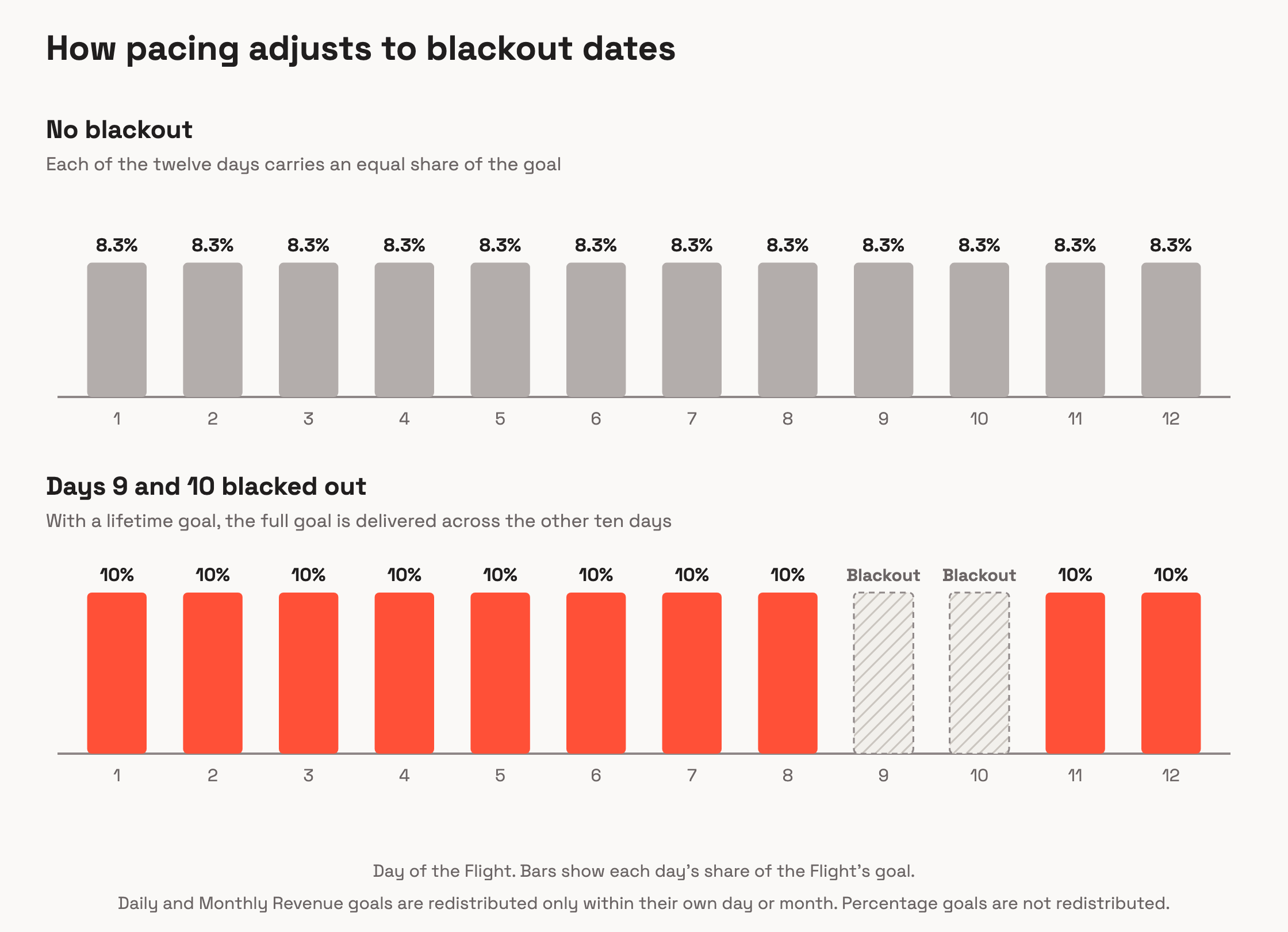
Blackout dates are the absolute-calendar counterpart to dayparting, which expresses recurring day-of-week and time-of-day patterns. Use dayparting for "every weekday morning." Use a blackout date for "the twenty-sixth of December."
Use blackout dates sparinglyA blackout stops the Flight completely, so its Advertiser gets no impressions or spend on those dates. Set one only when your business needs it, and check that the dates the Flight still serves can deliver its goal. If they cannot, the Flight underdelivers, as it would for any other booking the remaining dates cannot absorb.
When to use blackout dates
Blackout dates are for dates you know in advance and have a business reason to close: a store closure, a fixed promotional window, a date reserved for another client. They work best on Flights with a goal and enough remaining dates to deliver it.
Because a blackout stops the Flight serving, it also stops the revenue the Flight would have earned on those dates. A Flight with a lifetime goal recovers it across its other dates. A Flight without a paced goal, such as a percentage goal, or one with a Daily Revenue goal, does not.
We recommend blackout dates only when they match a real business requirement. To stop a Flight serving for a while, pause the Flight or Campaign. For recurring hours or days, use dayparting. To give a Flight priority over others on a date, use priority.
How blackout dates work
The goal is redistributed, not reduced. A blackout changes when delivery happens, never how much is owed. Pacing plans against the dates the Flight still serves, so the blacked-out dates take nothing from the goal and give nothing back.
Set blackout dates early. Add them before the Flight starts, or as early in its run as you can. Pacing replans against the full schedule each time it balances, so a blackout added to a Flight that is already running makes the Flight deliver faster for a short while to catch up. The longer the Flight has been running, the larger that step. For a Monthly Revenue goal, add blackouts before the month starts. Adding, changing or removing a blackout takes effect at the next balance, and delivery already made is not reversed.
Set through the API. You set blackout dates with the Management API, described below. They are not available in the Ad Server UI or in Console, so you cannot see or change them there. To see a Flight's blackout dates, read them back through the API.
Goal types. A blackout works with every goal type, and changing a Flight's goal type keeps its blackout dates. A lifetime goal is redistributed across the Flight's whole run. A Daily Revenue or Monthly Revenue goal is redistributed only within the day or month it belongs to, and is not carried into the next one. So a blacked-out day on a Daily Revenue goal is not delivered on another day, and a Monthly Revenue goal whose whole month is blacked out is not delivered. On a Monthly Revenue goal, the remaining amount is spread across the days in the month that are still open.
Flight status. A Flight with a blackout in progress stays Active. It reports zero delivery for those dates rather than disappearing from the Flight list.
Forecasts. Forecasts do not yet account for blackout dates. They continue to treat the Flight as available on those dates.
Changes are audited. Every create, update and delete is recorded in the Flight audit log.
Dates and time zones
StartDate and EndDate are calendar dates in YYYY-MM-DD format, and both are inclusive. A single-day blackout sets both to the same date.
Blackout dates apply for whole days in the Flight's own time zone, taken from the Flight's TimeZone field. A blackout starts at midnight at the beginning of its first date and ends at midnight after its last. There is no per-blackout time zone and no sub-day granularity. For part of a day, use dayparting.
Blackout dates on one Flight may not overlap. A range that overlaps an existing one is rejected. A Flight can carry up to 50 blackout ranges by default. The limit is set per network.
A range must fall inside the Flight's run: on or after its start date, and on or before its end date if it has one. A Flight with no end date accepts any range from its start date onward.
If the Flight's dates change, its blackout dates are kept. One that now falls outside the run has no effect, and applies again if the run is extended back over it.
If the Flight's time zone changes, its blackout dates stay on the same calendar dates, and those dates are read in the new time zone.
Management API
Blackout dates are a sub-resource of the Flight, at /v1/flight/{FlightID}/deliveryadjustment. In the API a blackout is a delivery adjustment with a Multiplier of 0. Every action returns 200 on success, and each has its own page in the API reference.
| Action | Endpoint |
|---|---|
| Create a blackout | POST /v1/flight/{FlightID}/deliveryadjustment |
| List the blackouts on a Flight | GET /v1/flight/{FlightID}/deliveryadjustment |
| Get a blackout | GET /v1/flight/{FlightID}/deliveryadjustment/{Id} |
| Update a blackout | PUT /v1/flight/{FlightID}/deliveryadjustment/{Id} |
| Delete a blackout | DELETE /v1/flight/{FlightID}/deliveryadjustment/{Id} |
To create a blackout, send a start date, an end date and a Multiplier of 0. Multiplier is required, and any other value is rejected.
curl -X POST -H "X-Adzerk-ApiKey:$ADZERK_API_KEY" \
  "https://api.kevel.co/v1/flight/12345/deliveryadjustment" \
  -d '{"StartDate":"2026-12-24","EndDate":"2026-12-26","Multiplier":0}'
It returns the new blackout. Multiplier is returned with two decimal places:
{
  "Id": 67890,
  "FlightId": 12345,
  "StartDate": "2026-12-24",
  "EndDate": "2026-12-26",
  "Multiplier": 0.00
}
A blackout that is in progress (its range includes today) can have its EndDate changed, so you can end it early or extend it. Its StartDate cannot change, and a blackout whose range has already ended cannot be changed. Delete removes a blackout, and an ended blackout can still be deleted.
Set blackouts when creating or updating a Flight
Create Flight (POST /v1/flight), update Flight (PUT /v1/flight/{FlightID}) and create Campaign with Flights (POST /v2/campaign and POST /v1/campaign) also accept a DeliveryAdjustments array on each Flight, so a Flight and its blackouts can be set in one call. Each entry takes the same properties as create.
{
  "Name": "Holiday sale",
  "StartDateISO": "2026-12-01T00:00:00Z",
  "EndDateISO": "2027-01-15T23:59:59Z",
  "DeliveryAdjustments": [
    { "StartDate": "2026-12-24", "EndDate": "2026-12-26", "Multiplier": 0 }
  ]
}
With POST /v2/campaign, set DeliveryAdjustments on each Flight in the Flights array, the same way as SegmentTargeting. Campaign create only creates. To change a Flight's blackouts afterwards, use update Flight or the blackout endpoints.
On update Flight, DeliveryAdjustments works the same way as SegmentTargeting:
| What you send | What happens |
|---|---|
| The field is left out | Existing blackouts are not changed |
| An array | The array becomes the Flight's full set of blackouts. An entry with an Id updates that blackout, an entry without one creates a new blackout, and an existing blackout left out of the array is deleted |
[] or null | All blackouts are removed |
Entries are validated as they would be through the blackout endpoints, against the Flight's dates as they are after the update. An existing blackout sent back unchanged with its Id skips the date checks, so an ended or in-progress blackout can be sent back as it is, but it is still checked against the Flight's run and the other entries. To change a Flight's dates without touching its blackouts, leave DeliveryAdjustments out of the request.
Get Flight (GET /v1/flight/{FlightID}) returns the Flight's blackouts in DeliveryAdjustments, or null when it has none. The list Flight endpoints do not return them.
Errors
A request that fails validation returns 400 with an Errors array. Each entry has a message, and most also carry the value that failed and its path. A request with several problems can return several entries.
| Cause | Message |
|---|---|
| A required property is missing | Value at '[:body]' does not contain required key(s) 'EndDate'. |
A date is not a real YYYY-MM-DD date | Value at '[:body "StartDate"]' was not a valid date in format 'iso-local-date'. |
EndDate is before StartDate | EndDate must not be before StartDate. |
Multiplier is not a number | Value at '[:body "Multiplier"]' must be a number. |
Multiplier is anything other than 0 | Multiplier must not be negative. / Multiplier must be numeric zero. |
| The range overlaps another blackout on this Flight, including sharing a start or end date | Delivery adjustment overlaps another adjustment on this flight. |
| The range falls outside the Flight's run | Delivery adjustment dates must fall within the flight's start and end dates. |
| The range has already passed. The current date, in the Flight's time zone, is accepted | Delivery adjustment dates cannot be in the past. |
| An update changes the start date of a blackout in progress, or changes a blackout that has ended | Delivery adjustment has already started and its start date cannot be changed. / Delivery adjustment has ended and cannot be changed. |
| The Flight already has as many blackouts as the network allows (50 by default) | Cannot create new delivery adjustment. This flight has reached your network's limit. Please contact support. |
A DeliveryAdjustments array on a Flight is longer than the network allows | Number of DeliveryAdjustments exceeds your network's limit for this flight. Please contact support. |
A Flight that does not exist in your network, or has been deleted, returns 404 with Flight not found. The exception is delete, which returns 404 only for a deleted Flight, and 200 for a Flight that does not exist in your network. On a network where blackout dates are not switched on, the blackout endpoints, and any non-empty DeliveryAdjustments array on a Flight, return 403 with This feature is not enabled for your network.
Moving from a custom targeting blackout
If you now close dates with a negated $datetime.timestamp range in custom targeting, create the blackout for those dates first, then remove the custom targeting rule. While both are set, the Flight behaves as it does with the blackout alone.
A blackout cannot cover dates that have already passed, so a Flight that has already been dark under custom targeting keeps the shortfall from those dates and attempts to make it up across the dates it has left.
Updated about 8 hours ago